
Enterprise Banking
Retail & Corporate
UX Research
UXUI Redesign
Web
B2C
B2B
MVP Launched
Role
Lead Product Designer
Timeline
May – Nov 2025 (MVP 1)
Platform
Web (Responsive)
Scope
Retail & Corporate
Nov '25
MVP 1 launched on time and on scope
2 Types
User segments served Retail & Corporate
+75%
Improvement in user satisfaction score
Positive
Positive customer response at launch
Imagine you are a finance director at a thriving Lagos-based company. Your company banks with Coronation Merchant Bank a respected name in Nigeria's financial sector. But every time you need to initiate a bulk payroll run, approve a vendor payment, or check your company's FX position, you brace yourself. The platform is slow. The interface feels like it was designed in a different era. Approvals require navigating through multiple confusing screens. Worse, the system occasionally times out mid-transaction forcing you to start over.
Now imagine you are a Private Banking client high net worth, time-poor, and accustomed to premium experiences in every other facet of life. You log onto Coronation's internet banking platform and feel underwhelmed. Where is the portfolio overview you need at a glance? Why does downloading a statement involve five clicks? Why can't you see your investment performance alongside your account balances in one place?
These were not hypothetical scenarios. They were real frustrations voiced by real customers and they sat at the heart of why Coronation Merchant Bank made the bold decision to not just patch its existing internet banking platform, but to rebuild it entirely.
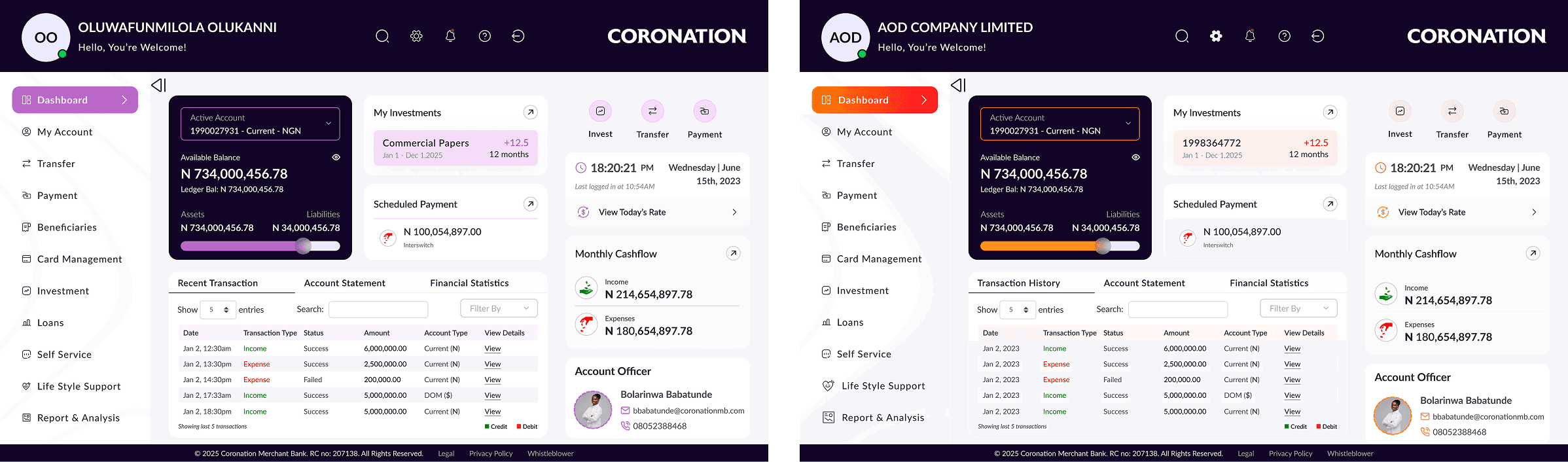
In May 2025, Coronation Merchant Bank officially kicked off a strategic initiative to completely rebuild its Internet Banking Platform covering both Retail (Affluent and Private Banking) and Corporate clients The goal was clear: deliver a seamless, secure, and modern digital banking experience that could scale with the bank's growth ambitions and meet the rising expectations of a sophisticated client base.
This was not a minor refresh or a reskin. It was a ground-up redesign and rebuild spanning user onboarding, authentication, account management, payments, transfers, investments, loans, card management, customer support, analytics, and a powerful admin portal for bank staff. The scope was ambitious, the timeline aggressive, and the stakes high. A bank's digital platform is, increasingly, its primary touchpoint with clients.
Understanding the Problem Space
Good design starts with good questions. Before a single wireframe was sketched, I invested time in understanding the ecosystem the business, the users, and the existing platform's shortcomings. This meant extensive stakeholder engagement across the bank's business units, as well as direct conversations with customers and a deep dive into existing feedback data.
Stakeholder Interviews & Discovery Workshops
The BRD approval process itself was a goldmine of insight. With sign-offs required from 15+ senior stakeholders including the CTO, CISO, Group Heads of Corporate, Affluent, Private, and Investment Banking each approval came with commentary, caveats, and requirements that added texture to the project scope
Key themes that emerged from stakeholder sessions:
Corporate clients needed a robust Maker-Checker workflow for payment authorisations the old system made this cumbersome
The Admin Portal needed at minimum 3 distinct role levels (Security Admin, Control Admin, Operations Admin) with flexibility to add custom roles
Third-party integrations (IMTO providers, payment gateways, utility aggregators) needed thorough documentation before deployment
Marketing wanted the ability to push promotional content and advert banners directly within the platform
The CISO mandated that bulk request approvals must be handled entirely by either the customer or bank staff not split between both
Customer Research & Existing Feedback Analysis
Beyond internal stakeholders, I engaged directly with customers across the target user segments Corporate clients, Affluent Banking clients, and Private Banking clients. I also analysed historical feedback data from users of the existing platform to identify recurring pain points.
"The old platform felt like a chore. I sometimes had to send instructions to my relationship manager because it's faster than fighting with the online banking."
- Corporate Banking Client
Key Pain Points Identified
Performance & Reliability: Slow load times and session timeout issues
Navigation Complexity: Users struggled to find key features
No Self-Service: Simple tasks required branch visits or had to call relationship managers
Corporate Workflow Gaps: Poorly designed Maker-Checker flows
Fragmented Financial View: No holistic view of accounts
Not Responsive: Platform unusable on mobile browsers
Security Friction: Security measures created unnecessary barriers
Two Users, One Platform
One of the most important early design decisions was acknowledging that Retail and Corporate user have fundamentally different mental models. A Corporate Finance Manager authorizing a payroll run thinks very differently from a Private Banking client checking their investment portfolio.
Retail User
Affluent & Private Banking Clients
Needs: Simplicity, speed, holistic financial overview, self-service, investments and loan visibility, lifestyle features, mobile-first access
Corporate User
SME, Corporate & Institutional Clients
Needs: Role-based access, Maker-Checker workflows, bulk payments, multiple account management, payroll, audit trails, scheduled reports
The Core Problem Statement
Problem Statement
Coronation Merchant Bank's existing internet banking platform was failing its customers technically, experientially, and commercially. Retail clients lacked the self-service capabilities and financial clarity they needed. Corporate clients were hampered by clunky approval workflows and limited bulk processing tools. The platform's outdated architecture meant it couldn't scale. The bank needed a completely new digital banking experience one that would serve both user segments intuitively, build trust through reliability, and position CMB competitively in Nigeria's evolving digital banking landscape.
Design Principles
Based on research synthesis, I established five core design principles that would guide every decision throughout the project:
Retail and Corporate experiences tailored to context while sharing a unified design system.
Security measures should protect without creating barriers that frustrate legitimate users
High-frequency tasks (transfers, statement downloads, approvals) should be completable in as few steps a
possible.
A banking platform earns trust through predictable, reliable interactions. Visual and interaction consistency is non-negotiable.
Every screen should communicate, not impress. Users should always know where they are and what to do next.
Information Architecture & User Flows
Before any screen was designed, I mapped the complete information architecture for both user types. This was one of the most critical and most challenged pieces of work in the project. Getting the IA wrong would cascade into every subsequent design decision.
The IA had to accommodate 10+ distinct feature areas: Onboarding, Authentication, Account Management, Transfers, Payments, Alerts & Notifications, Reports & Analytics, Banking Services (Cards, Investments, Loans), Customer Support, and an Admin Portal for bank staff.

I developed separate user flows for the most critical journeys:
New user onboarding (individual self-registration vs. corporate branch-assisted setup)
Authentication flow with 2FA
Interbank and FX transfer journeys
Corporate Maker-Checker payment authorisation workflow
Bulk payment upload and processing flow
Card management (activate, block, set limits)
Investment booking and monitoring flow
Service request submission and tracking

Step-by-step flow for individual customers making interbank transfers

Dual-control authorization workflow for corporate banking transactions
Wireframing: Thinking in Structures
With flows validated against business requirements and research insights, I moved into wireframing. I used low-fidelity wireframes to rapidly explore structural options before committing to visual design. This stage was deliberately kept rough the goal was to test logic, not aesthetics.
Wireframing at this stage surfaced several structural debates:
Dashboard layout: Should the primary account summary be a card carousel or a tabular list? (Research showed corporate users with multiple accounts preferred the structured table view; retail users preferred the card carousel for its visual clarity)
Navigation model: Should the platform use a top navigation bar or a sidebar? (We explored both the final decision leaned toward a persistent sidebar for desktop, given the depth of features and the corporate use case)
Transfer flow: Should beneficiary selection and amount entry be on one screen or split across steps? (We tested both split steps tested better for accuracy and reduced user errors)
Wireframe: Dashboard Explorations
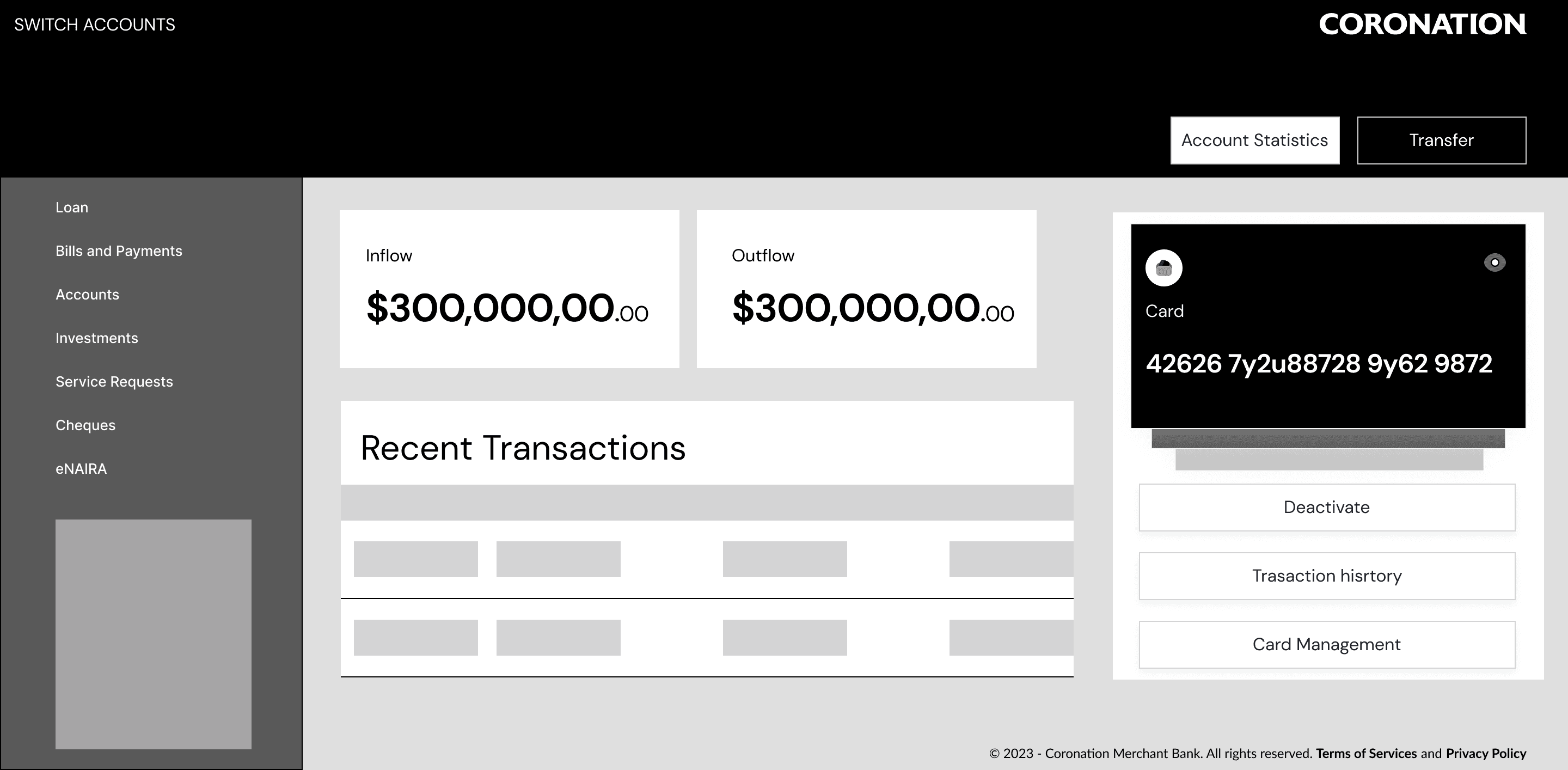
Dashboard layout Iteration 1

Dashboard layout Iteration 2
Design System & Visual Language
A consistent, scalable design system was non-negotiable for a platform of this complexity. I built a component library in Figma that would serve as the single source of truth for all interface elements ensuring consistency across 50+ screens and enabling the development team to implement components faithfully.
Key design decisions in the visual language:
Colour: CMB's brand palette anchored the system. A clear distinction was established between primary actions (CTAs), status indicators (success, warning, error), and informational elements
Typography: A clear typographic hierarchy was established with distinct scales for headings, body text, labels, and data values (particularly important for financial figures)
Spacing & Grid: An 8-point grid system was used throughout for consistent spacing and alignment
Components: A complete library of reusable components buttons, form fields, modals, tables, cards, notification banners, and data visualisation elements was built and documented

Some Retail & Corporate Component Library
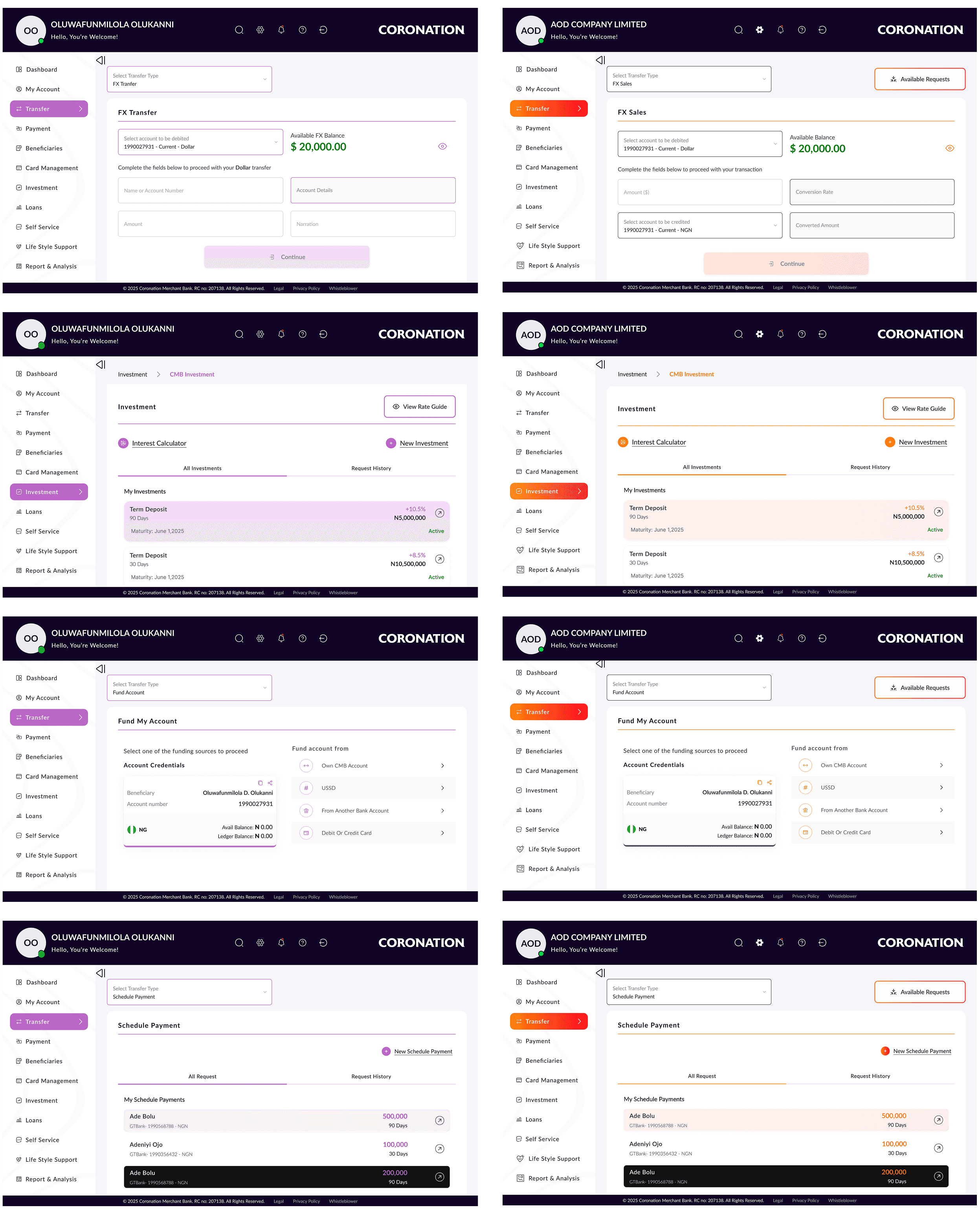
Rather than building a single, generic multi-recipient payment flow, I designed two distinct transfer experiences Multiple Transfer for Retail users and Bulk Upload alongside Multiple Transfer for Corporate users both sharing the same underlying design system but structured around the fundamentally different ways each user type thinks about sending money to more than one recipient.
The Retail Multiple Transfer flow was designed for the individual who occasionally needs to split a payment across a handful of recipients a salary advance to two employees, rent and utilities paid together, or splitting funds between family members. The experience is personal, manual, and conversational: users add recipients one at a time, see each beneficiary card appear inline, and confirm the full list before a single authentication step clears all transfers in one go. The interface keeps every recipient visible simultaneously so the user can review the full picture before committing.
The Corporate experience required an entirely different architecture. A corporate finance team managing payroll for 200 staff members, or disbursing vendor payments across dozens of accounts, cannot add recipients one at a time. For them, I designed a Bulk Upload flow a CSV or Excel file upload with a validation layer that catches errors (duplicate account numbers, mismatched beneficiary names, missing reference codes) before any transaction is initiated. Once validated, the file generates a structured payment batch that flows directly into the Maker-Checker approval workflow. Corporate users also retain access to the manual Multiple Transfer option for ad-hoc multi-recipient payments where a spreadsheet would be overkill.
Rationale:
Research and stakeholder sessions surfaced a clear behavioral divide. Retail users adding multiple recipients were doing so intentionally, one decision at a time they wanted to see and control each entry. Corporate finance users, by contrast, were working from pre-prepared payment schedules, payroll exports, and vendor lists that already existed as structured data files. Forcing them to manually re-enter that data inside a banking interface would have introduced transcription errors, wasted significant time, and created exactly the kind of friction that was driving corporate clients to workarounds. The design decision was not just about convenience it was about matching the tool to the actual workflow each user type already had in place before they opened the app.
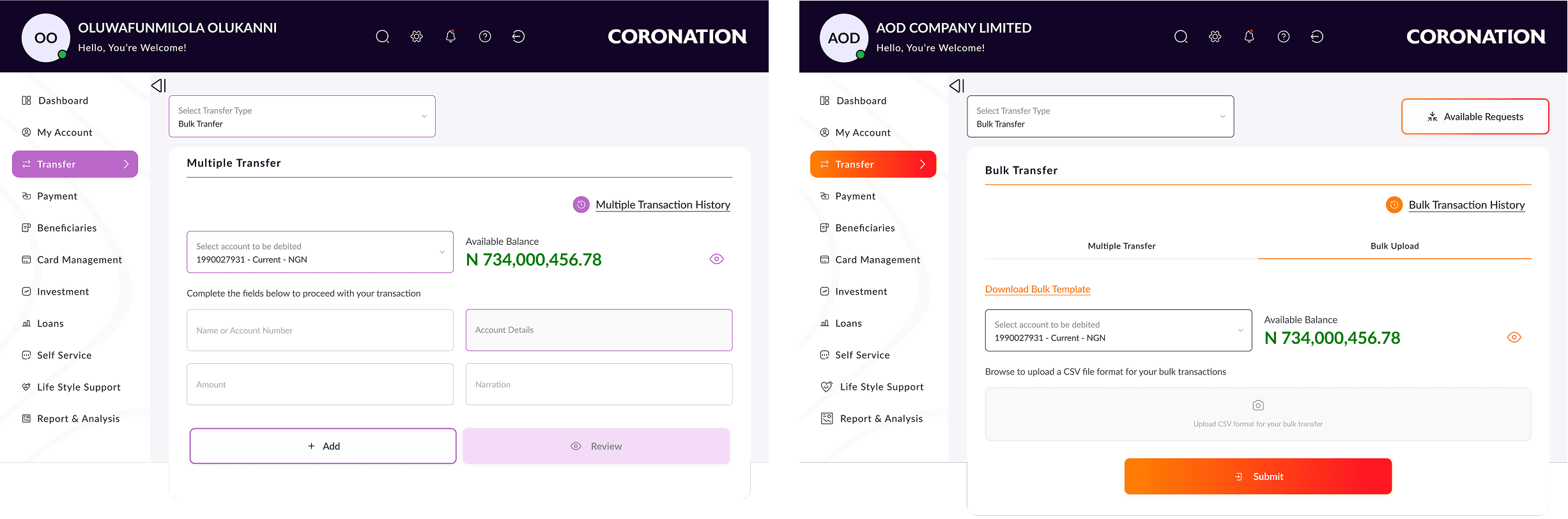
Dual-Mode Multiple Transfer
The corporate payment authorization flow was the most critical pain point in the old system. Approvers received inadequate context about what they were approving, and the flow was opaque. I redesigned this to give Approvers a rich, clear summary of every transaction detail before approval or rejection. The entire audit trail who initiated, who approved, timestamps was made accessible and downloadable.
Rationale:
Clear approval context reduces errors and builds trust in the system.
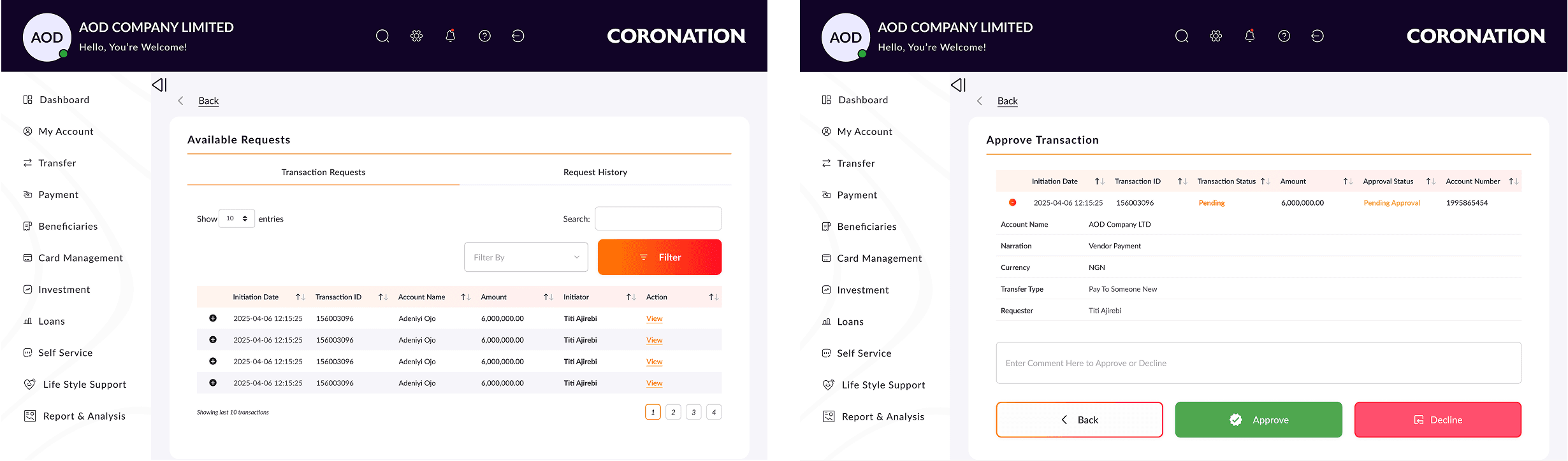
Maker-Checker Workflow Redesign
Banking platforms are feature-rich, creating a real risk of overwhelming users. I applied progressive disclosure throughout surfacing the most important information upfront and revealing complexity only when needed. For Pay Someone New, the best bank suggestions will display once the users start entering the account number, the user picks the right bank from the suggested banks and the account names auto populate; more complex options like
Pay Existing Beneficiary, FX Transfers, Bulk Payments, and Schedule Payments are shown prominently via a drop-down selector and are at the same level but contextually selected.
Rationale:
This keeps the interface clean without hiding functionality.
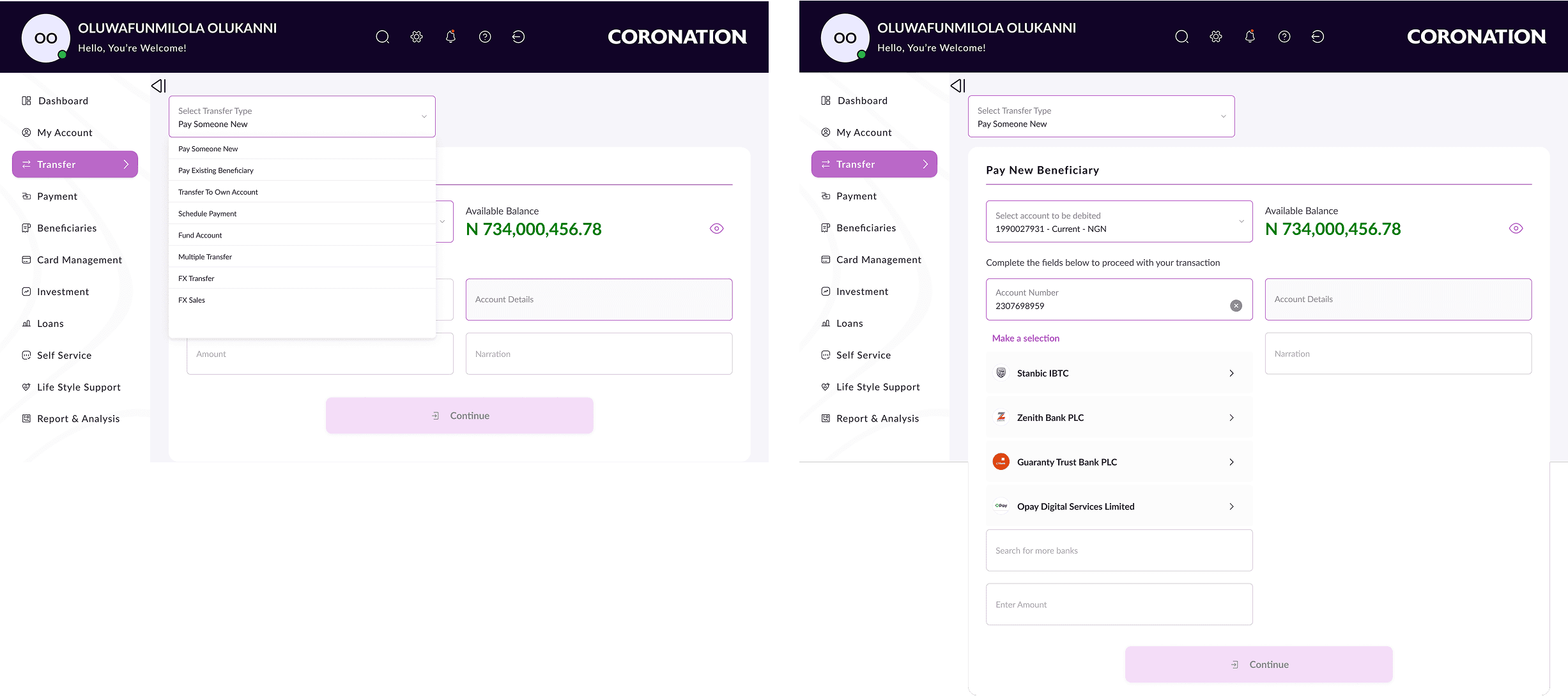
Progressive Disclosure for Complex Features
One specific design decision that had strong user research backing: showing the Available Balance prominently on the transfer and payment screens (with a hide/show toggle). Users repeatedly told us in research that one of the most frustrating things about the old platform was having to navigate away from a transfer screen to check their balance.
Rationale:
Surfacing it directly with a clear visual hierarchy that the balance is live data reduced cognitive load and prevented transaction errors.
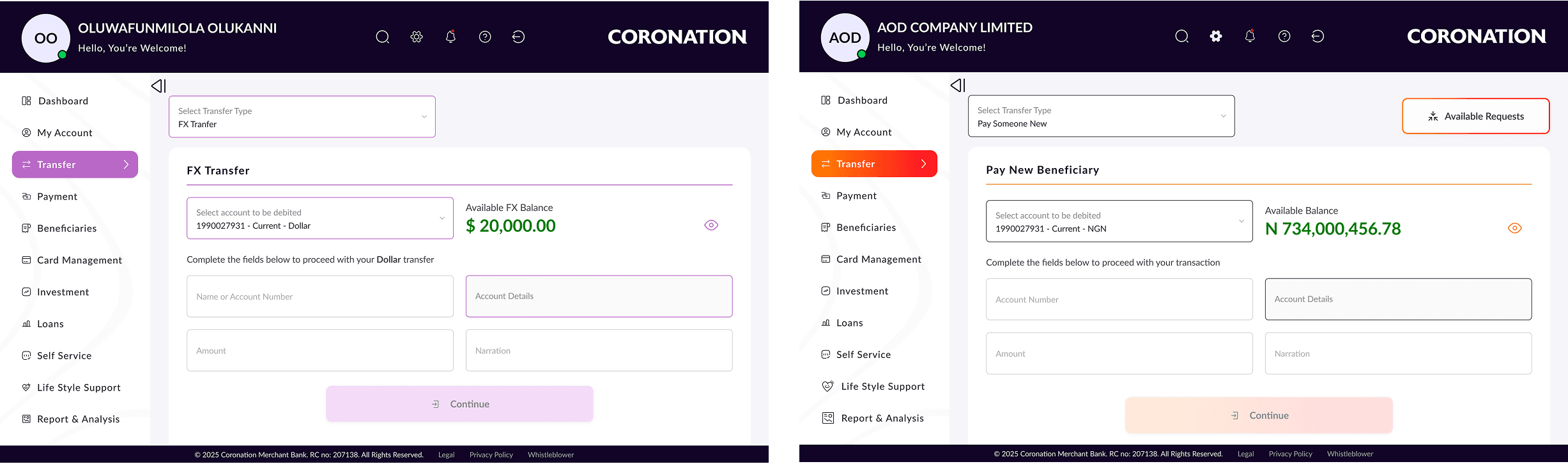
Showing Live Balance in Transfer Flows
BEFORE
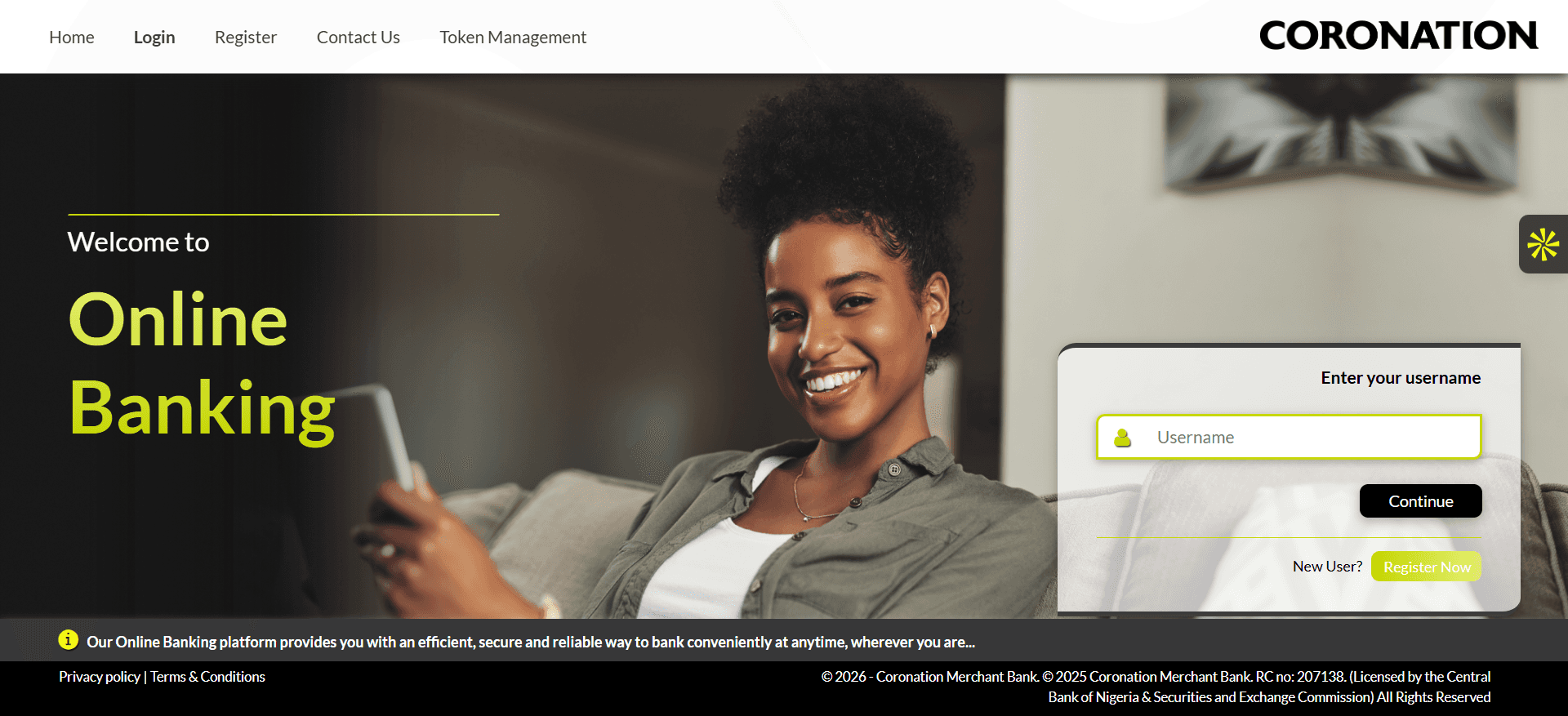
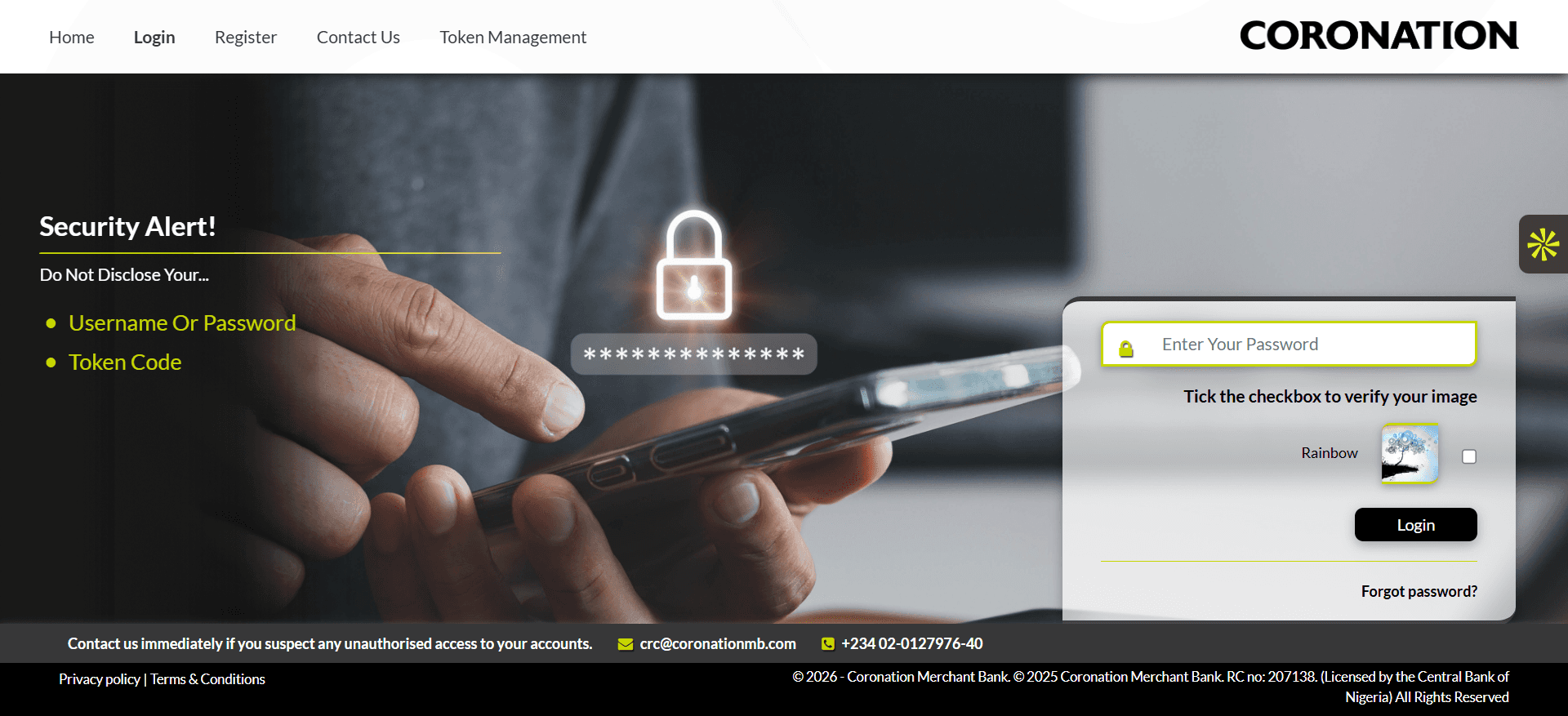
old Username and password login screens
AFTER
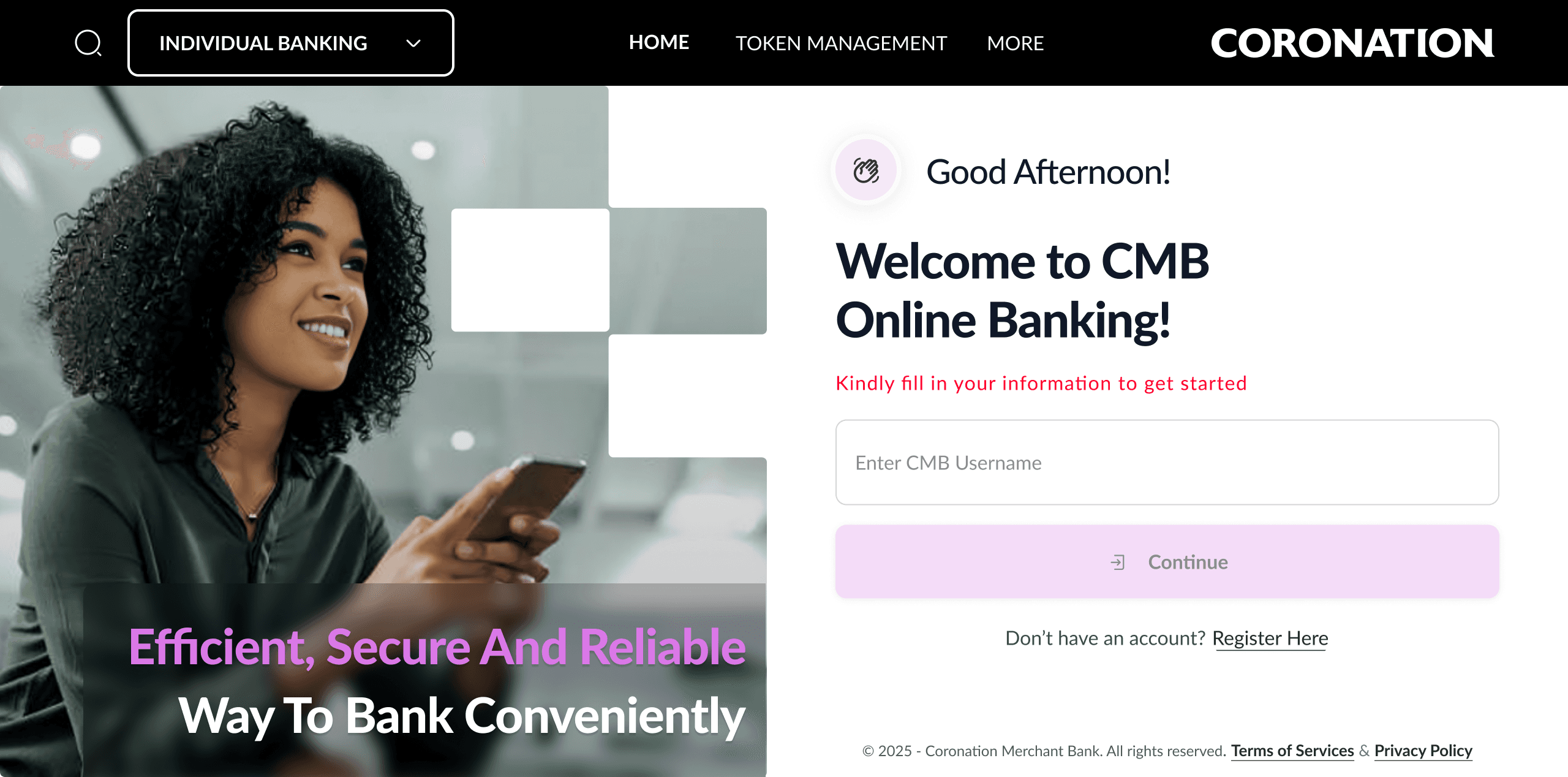
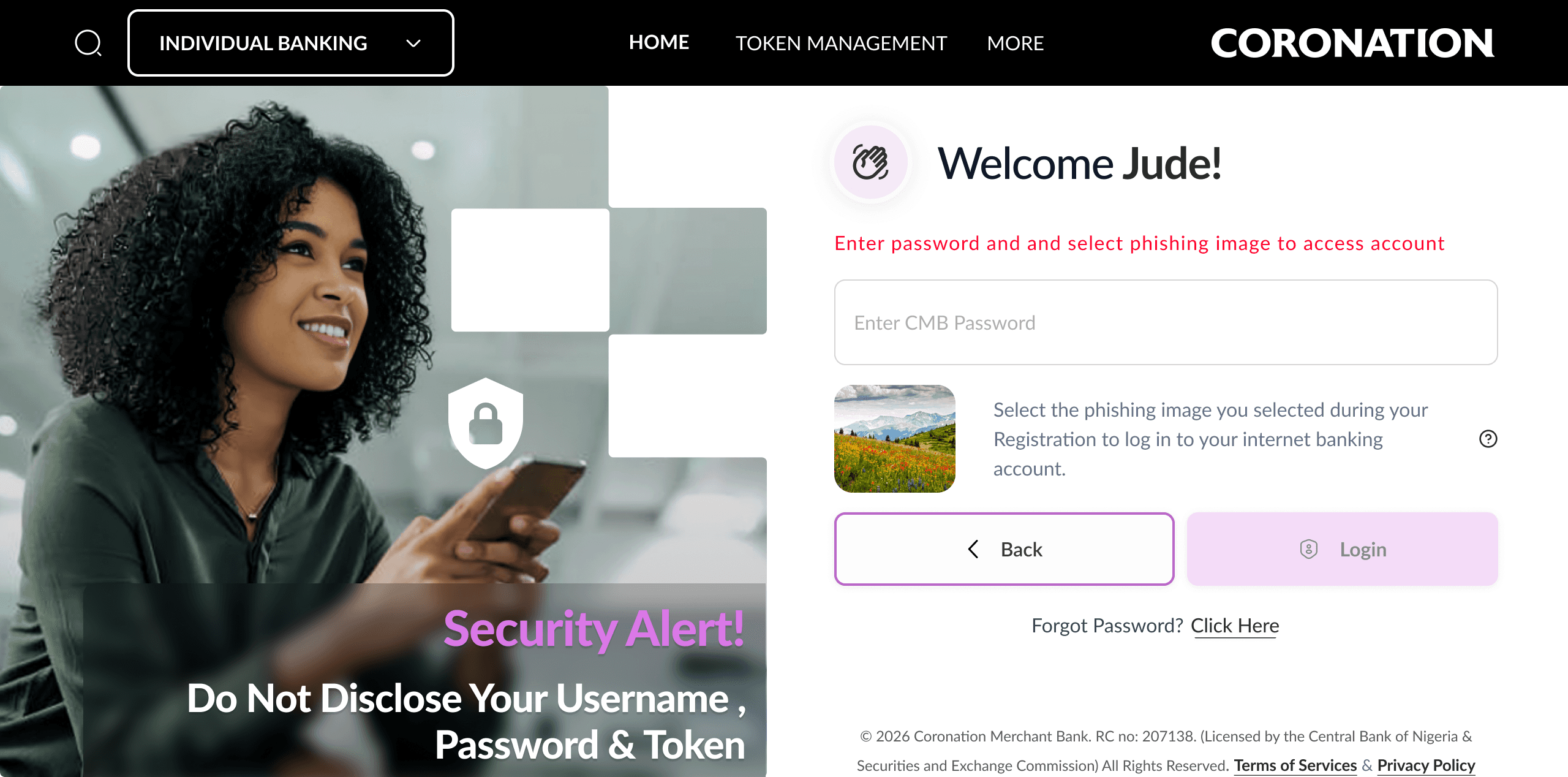
Clean, secured, redesigned username and password login screens
BEFORE
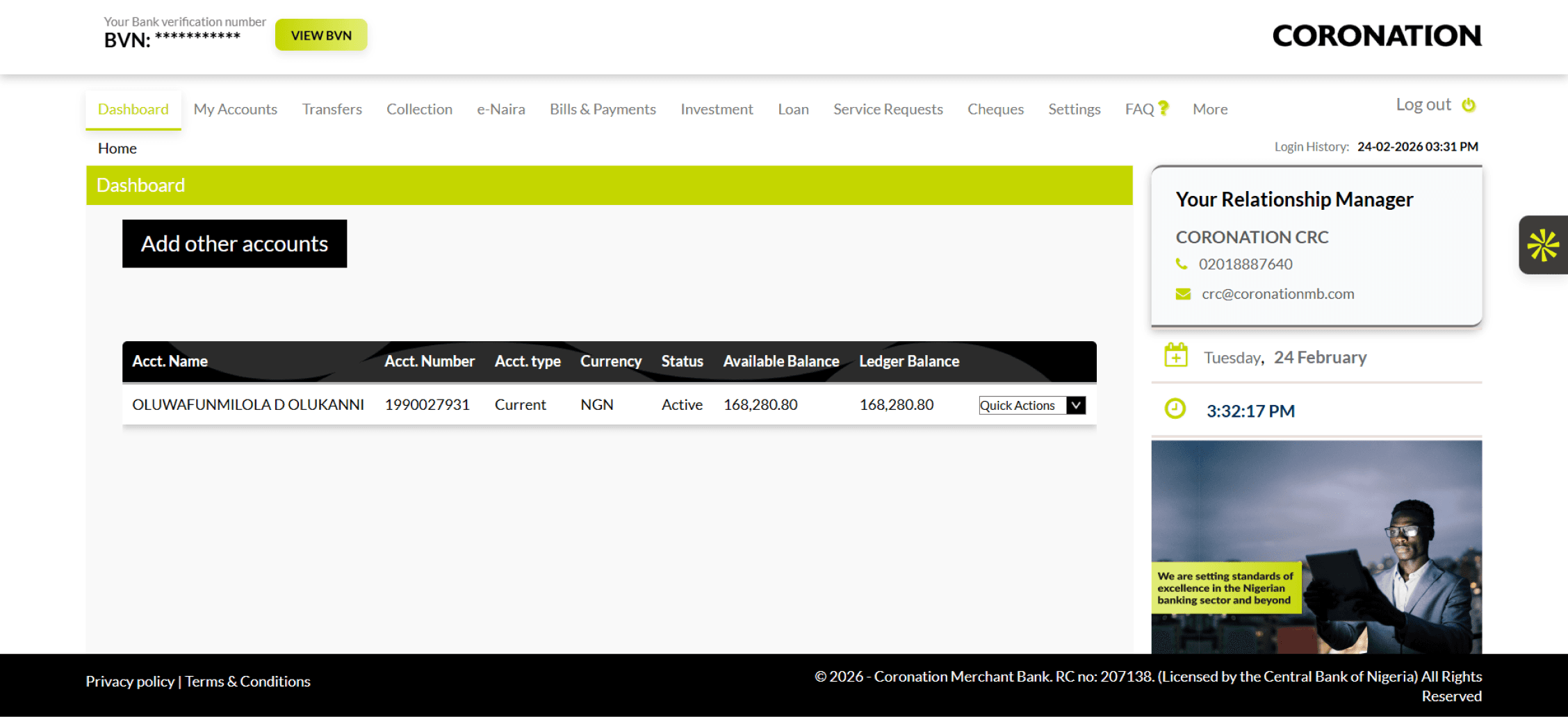
Old Dashboard - Flat account table, no financial overview, no quick actions
AFTER
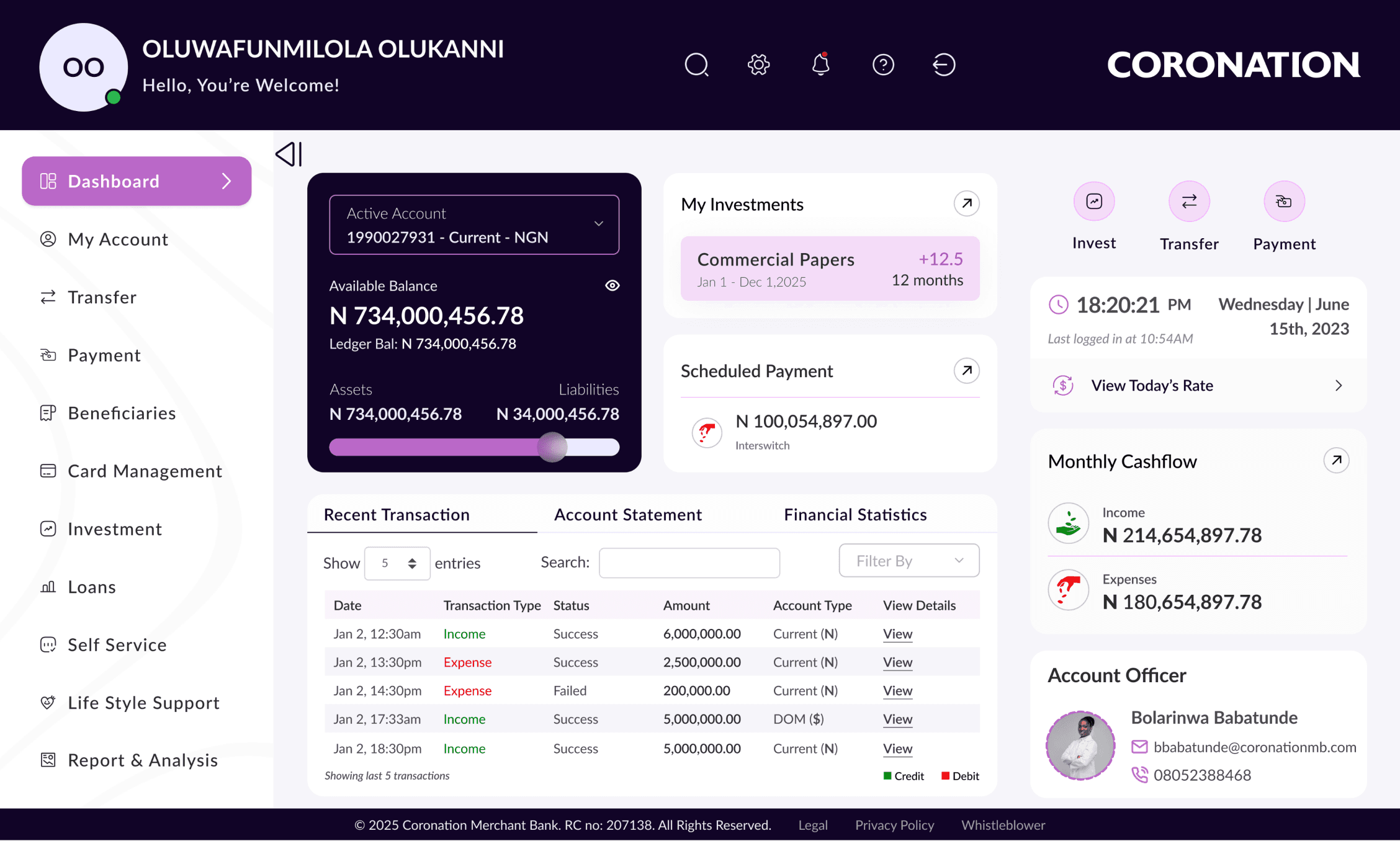
New Dashboard - Holistic financial view, live balance, investments overview, cashflow analytics
BEFORE
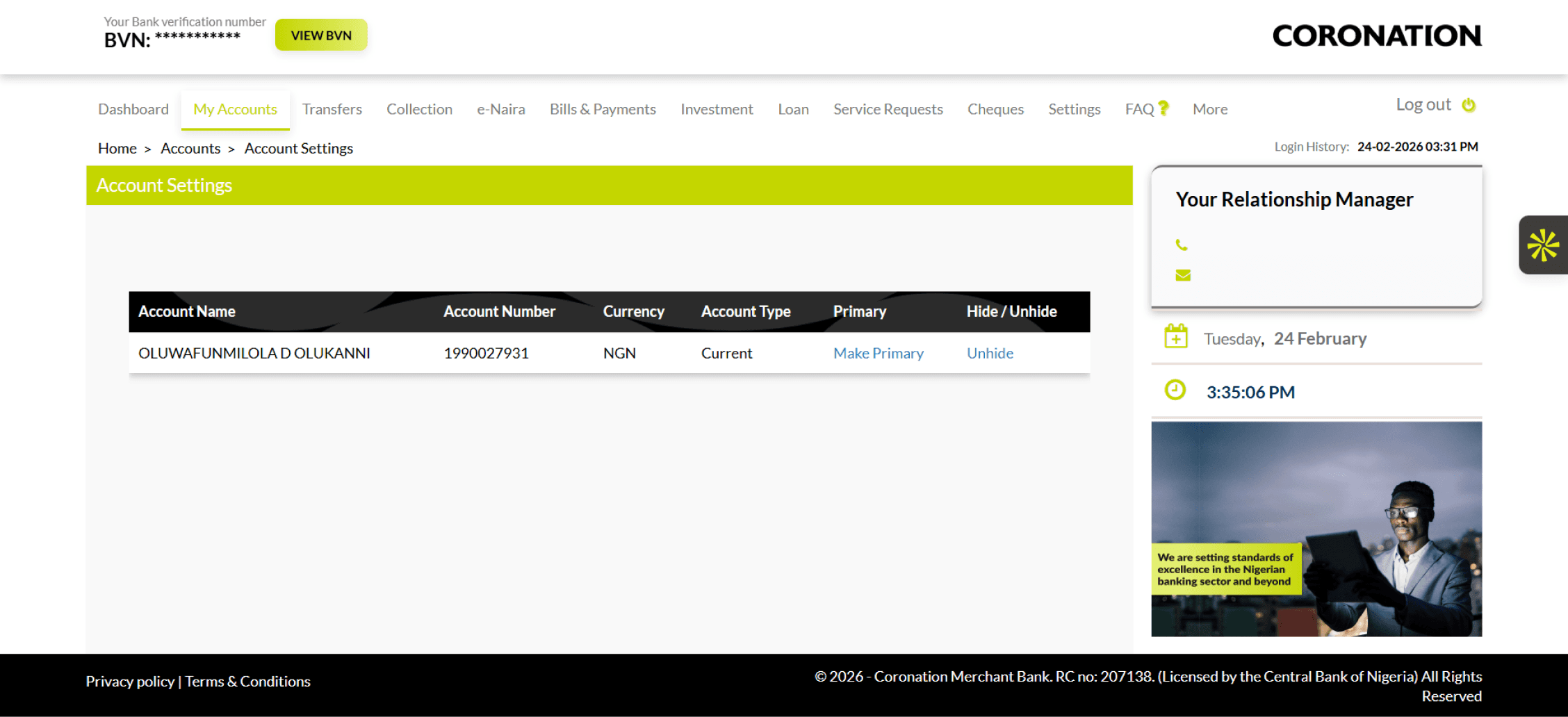
Old Account Page
AFTER
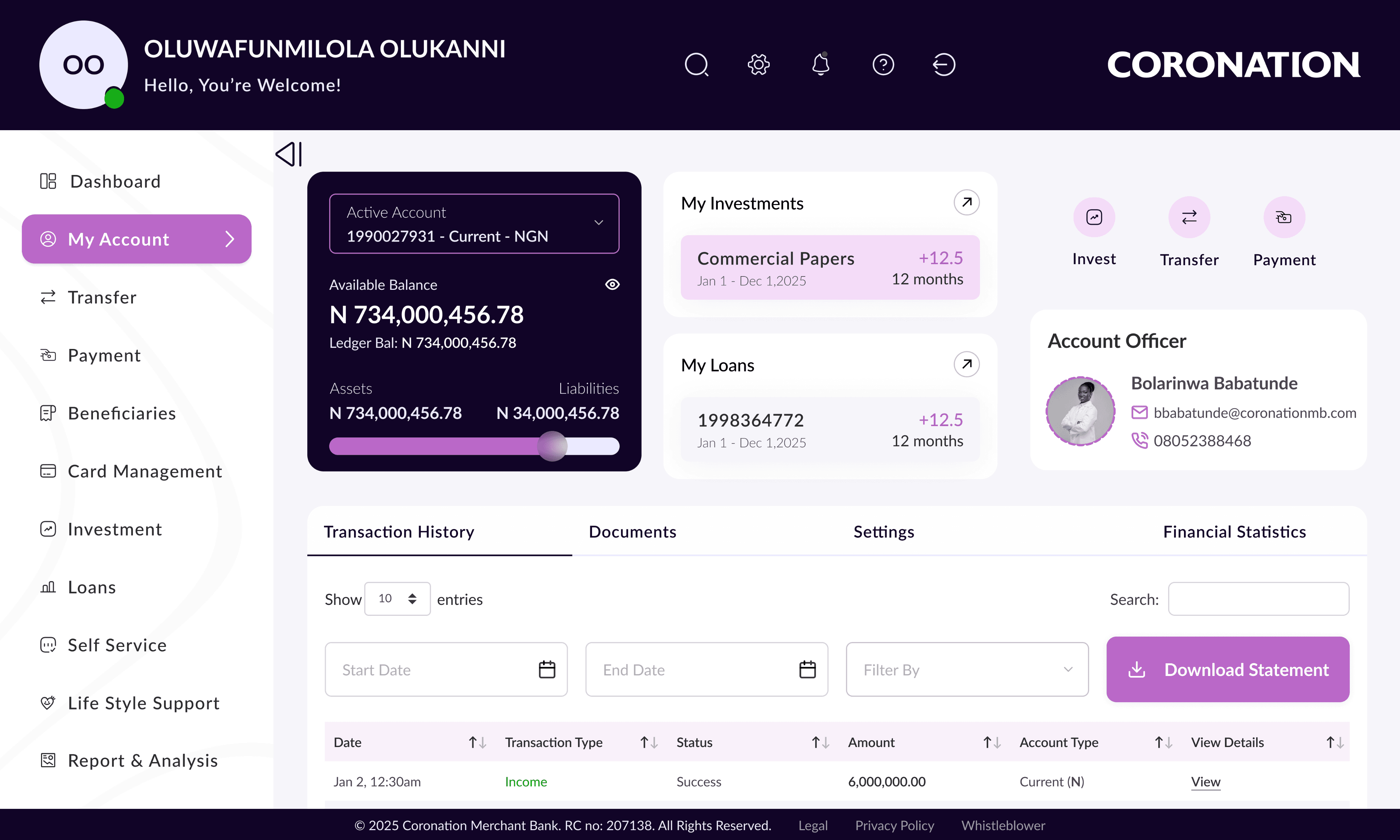
New Account Page
BEFORE
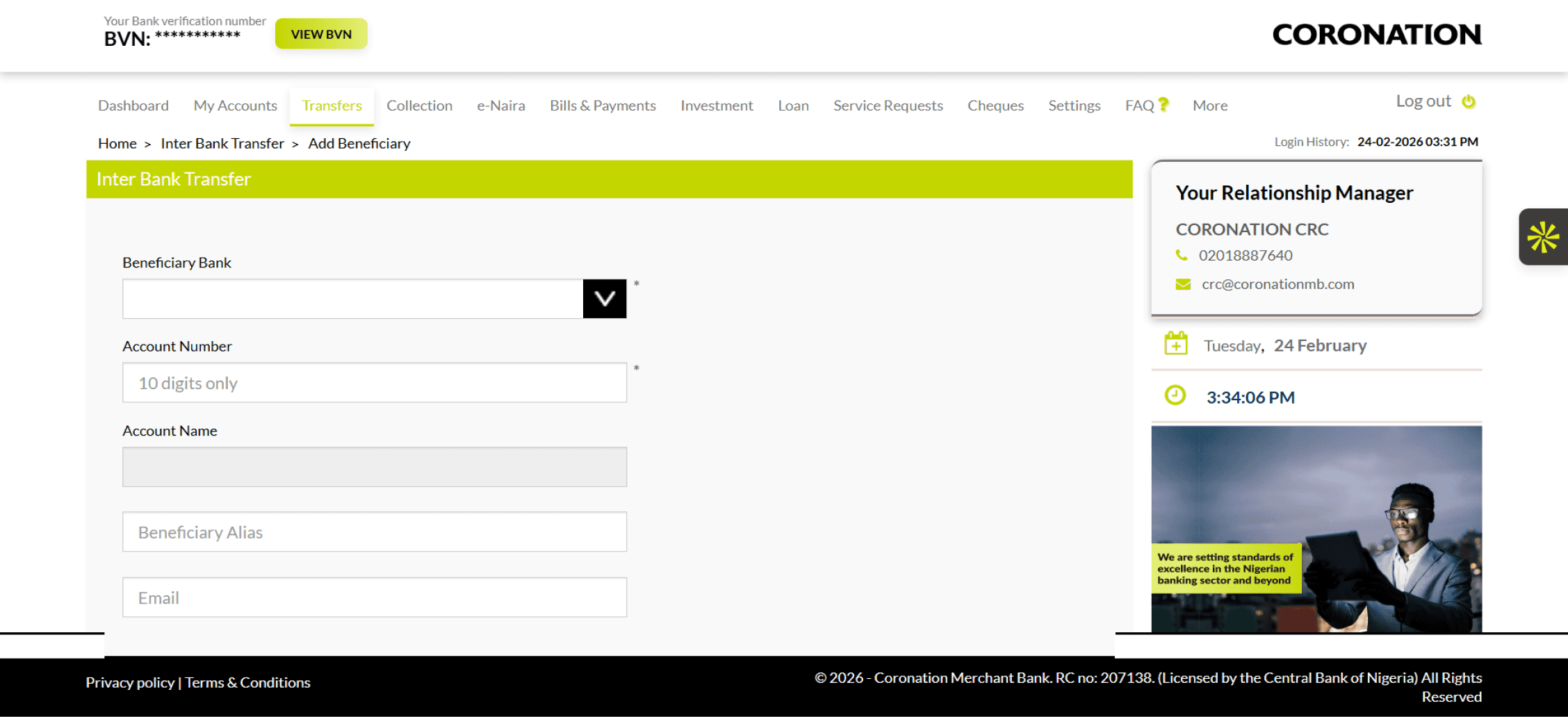
Old Transfer Page
AFTER
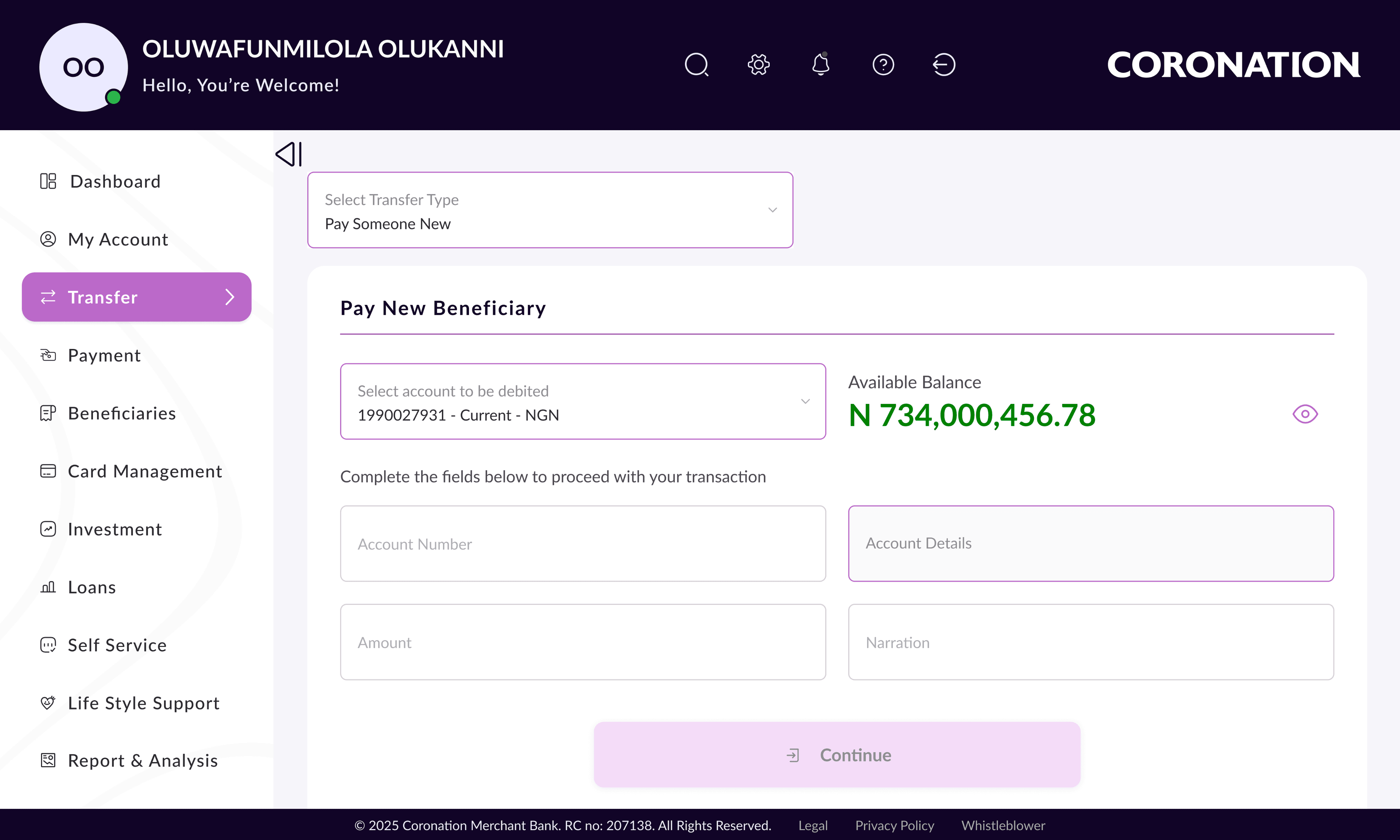
New Transfer Page
The following screens are some new capabilities that did not exist in the old platform areas where the redesign added significant new value:
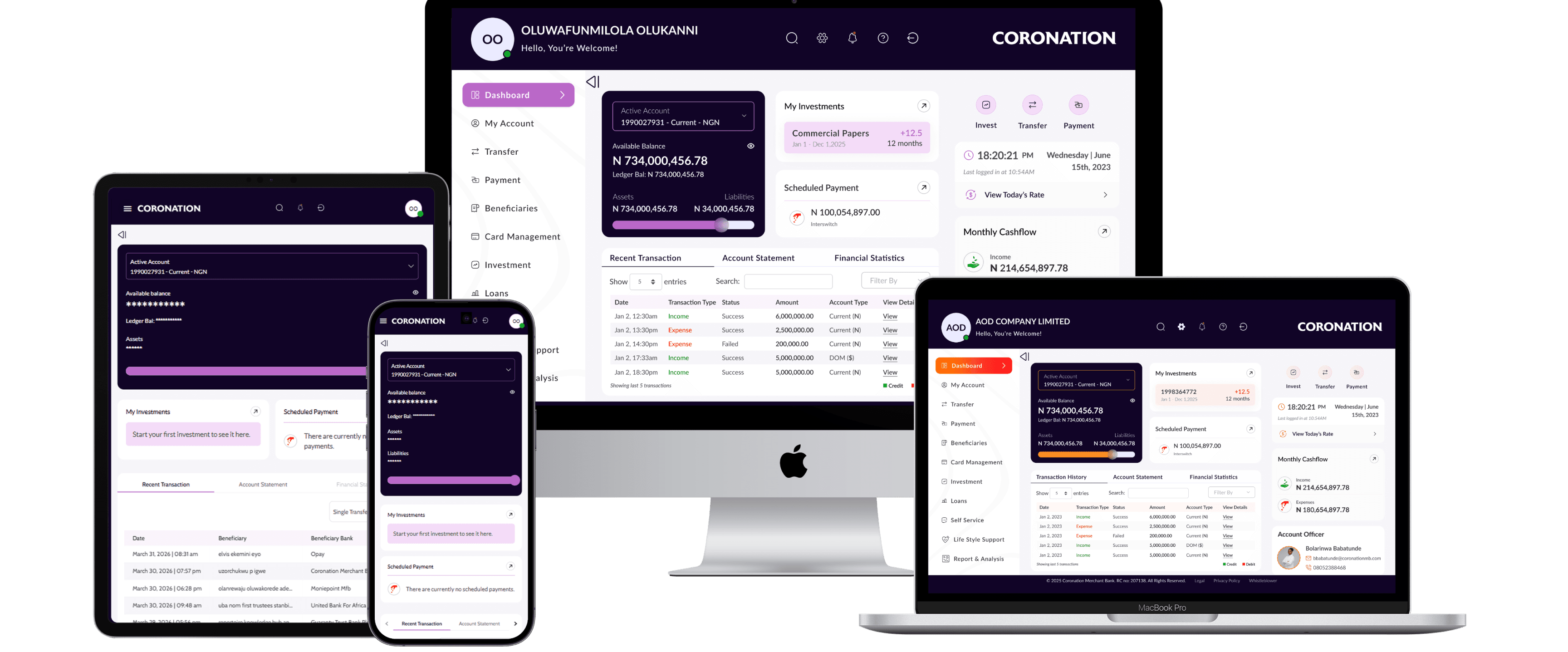
Responsive Screens
Nov '25
MVP 1 launched on time and on scope
2 Types
User segments served Retail & Corporate
+75%
Improvement in user satisfaction score
Positive
Positive customer response at launch
High onboarding adoption from existing customers invited to migrate
Positive reception to the new dashboard layout and quick-action shortcuts
Reduction in support calls related to navigation and feature discoverability
Corporate clients specifically praised the redesigned Maker-Checker workflow
- Retail Banking Customer, Post-Launch Feedback
- Corporate Banking Customer, Post-Launch Feedback
What Worked Well
Leading with research grounding decisions in user data
Building the design system early
Staying close to development
Progressive scope management
What I Would Do Differently
Earlier and more frequent usability testing
Earlier involvement of Customer Service team
More formal design specification documentation
MVP 1 is live and performing well. The roadmap ahead includes: The Prime Brokerage, Payment Tags, Lagos State Collections, Daily Limit Management, MyBankStatement initiative, Prime Brokerage, NIBSS Direct Debit, Card Management, Life Style Support, Report and Analysis, expanded investment and loan self-service capabilities, and continued performance optimization. The design system and component architecture built for MVP 1 were deliberately engineered to support these evolutions.
Role
Lead Product Designer
Timeline
May – Nov 2025 (MVP 1)
Platform
Web (Responsive)
Scope
Retail & Corporate
© 2026 Oluwafunmilola Olukanni. All rights reserved.
Senior Product/UXUI Designer · Lagos, Nigeria