
Mobile Banking
B2C
Retail
UX Research
UXUI Redesign
MVP Launched
Role
Lead Product Designer
Timeline
Feb– Dec 2025 (2 MVPs)
Platform
iOS & Android
Users
Retail Customers
2 MPVs
Launched May & Dec 2025 on time
2
Platforms - iOS & Android simultaneously
+75%
Adoption rate, strong customer onboarding
Positive
Positive reception from staff and customers
Her name is Adaeze. She is 34, works in marketing at a mid-sized Lagos company, and banks with Coronation Merchant Bank. She is not a power user, she doesn't want to be. She wants to check her balance on her way to a meeting, quickly send money to her mother in Enugu before lunch, and pay her electricity bill without having to navigate five confusing screens while standing in a supermarket queue She wants the app to just work.
But every time Adaeze opens the CMB mobile app, the experience chips away at her confidence in the app and, by extension, in the bank. The login feels outdated. The home screen is overwhelming. Transfer involve too many errors with too little feedback. She has called customer service twice to complete transactions she should have been able to do herself in under a minute. She has started checking he competitors' apps, wondering if the grass really is greener.
Adaeze is not an edge case. She is Coronation Merchant Bank's customer. And in February 2025 the bank decided it was time to change her story.
In February 2025, Coronation Merchant Bank initiated the redesign of its mobile banking application for Retail customers covering Affluent Banking, Private Banking, and individual account holders. The objective was unambiguous: deliver a mobile banking experience so intuitive, so reliable, and so well crafted that customers would actively prefer to use the app over visiting a branch or calling relationship managers.
The redesign was not a cosmetic refresh. It was a ground-up re-imagining of the mobile experience from the onboarding flow and authentication, through to every core banking function: account overview transfers, payments, investments, card management, loans, service requests, customer support, FX transfer, Fx Sales and Self service.
The App Store Told the Story
Before meeting a single customer, I reviewed months of App Store and Google Play reviews for the existing CMB app. The pattern was immediate and consistent. Customers were not complaining about missing features they were complaining about the experience of using the features that already existed.
"I can't sign up it keeps saying my credentials are invalid whereas I already inputed my details correctly I don't like this at all"
Google Play Review - 1 star
"The experience has been very poor for new users like me. I can't sign up for over 1 month. The app keeps on asking me to accept terms and conditions. Meanwhile, there is no check box to tick in acceptance"
App Store Review - 1 stars
"Can someone please fix this app? The UI looks like it was designed in 2010"
App Store Review - 2 stars
Customer Interviews: The Seven Pain Points
Direct interviews with retail customers across both Affluent and Private Banking segments combine with stakeholder input and feedback data surfaced seven persistent pain points that the redesign needed to address:
Performance & Stability
The app crashed unpredictably, particularly during login and transfer flows. For a banking app, crashes are not just frustrating they destroy trust.
Authentication Friction
Login was slow and cumbersome. Users wanted biometric login (Face ID / fingerprint) as the default, not as a buried setting.
Navigation Confusion
The existing app's information architecture did not match how HNIs customers thought about their banking. Features were in unexpected places; critical actions were buried.
Outdated Visual Design
The app looked dated compared to competitor apps. This was not vanity customers perceived the visual quality as a signal of the bank's competence and reliability.
No Financial Overview
Customers had no at-a-glance view of their financial health. They had to navigate separately to check balances for multiple account holders, review transactions, and check investments.
Weak Self-Service
Tasks like PIN reset, profile updates, and account information required phone calls to the RMs or customer service. The app offered almost no self-service.
Research Insight That Changed Everything
The most important insight from research was not about a specific feature it was about trust. Multiple customers independently described the moment they lost confidence in the app, and almost every story was the same: a transaction seemed to process, the app gave unclear feedback, and the customer spent the next several minutes sometimes hours anxiously wondering whether their money had actually moved.
"I sent money and wasn't sure if it went through. I had to call the person I sent it to just to confirm. A bank app should never make me feel that way.
Private Banking Customer - Interview
This insight became a north star for the redesign: every interaction needed to close the loop. Every action needed clear, immediate, unambiguous feedback. Trust is built one micro-interaction at a time.
Problem Statement
Coronation Merchant Bank's retail customers need a mobile banking experience that make everyday financial tasks fast, transparent, and effortless because the existing app is slow, unreliable, visually dated, and requires too many steps to complete simple actions. The result is: eroded customer trust, increased reliance on Relationship Managers and call centers, and a growing perception that CMB is behind its competitors digitally.
Close Every Loop
Every action must have clear, immediate feedback. No ambiguity about whether something worked.
Fewer Taps, More Done
The most common tasks check balance, send money, pay bill should be completable in the fewest possible steps.
A Bank You Can Trust Visually
The visual language must communicate premium, modern, and reliable. If the app looks like it belongs in 2015, customers will assume the bank does too.
Financial Clarity at a Glance
The home screen should answer the three questions every customer has the moment they open the app: How much do I have? What's come in and gone out? What do I need to do?
Biometric First
Authentication should be invisible when it's working correctly. Biometrics are the default; passwords are the fallback.
Information Architecture
The first design artefact was not a screen it was a map. Before opening Figma's design panel, mapped the complete information architecture of the mobile app: every screen, every navigation path every entry and exit point.
The navigation model I landed on uses a bottom tab bar with four primary destinations: Home, Transact, Customization, settings. This keeps the most-used features home, transact, and customization always one tap away, while making less frequent features accessible without cluttering the primary navigation

User Flows: The Journeys That Had to Be Perfect
I mapped seven critical user flows before designing any screens. These were the journeys where the old app failed most visibly and where the new design had to win

Transact (Schedule Payment)

Payment (Buy Data)

Login (Biometrics)
Wireframing: Thinking Before Colouring
I invested heavily in wireframing before moving to visual design. The wireframing phase was where the most important structural decisions were made and where several early assumptions were challenge and revised.
Bottom navigation vs. hamburger menu
Research strongly indicated that bottom navigation wins on mobile for banking apps. Users don't want to remember where features live; they want them visible at all times. The hamburger menu was used to incorporate more menu or features.
Home screen density
I tested three layouts: minimal (balance only), medium (balance + recent transactions + quick actions), and rich (full financial overview). The medium density tested best it answered the user's immediate questions without requiring scrolling to start.


Transfer flow: single screen vs. step-by-step
The step-by-step won decisively: it reduced cognitive load, made errors easier to catch before submission, and allowed better in-progress feedback at each stage.
The Design System: Consistency at Scale
I built a mobile-specific design system in Figma that covered every component the app would need. Key decisions included:
Touch targets: minimum 44x44pt for all interactive element
Typography scale: Display (28sp), Heading 1 (24sp), Heading 2 (20sp), Body (16sp), Caption (13sp)
Colour accessibility: all colour combinations tested for WCAG AA contrast compliance
Safe area awareness: all layouts account for iPhone notch, Dynamic Island, and Android navigation gestures
Dark mode architecture: component colors defined as semantic tokens to enable dark mode

Some Mobile Component Library
1
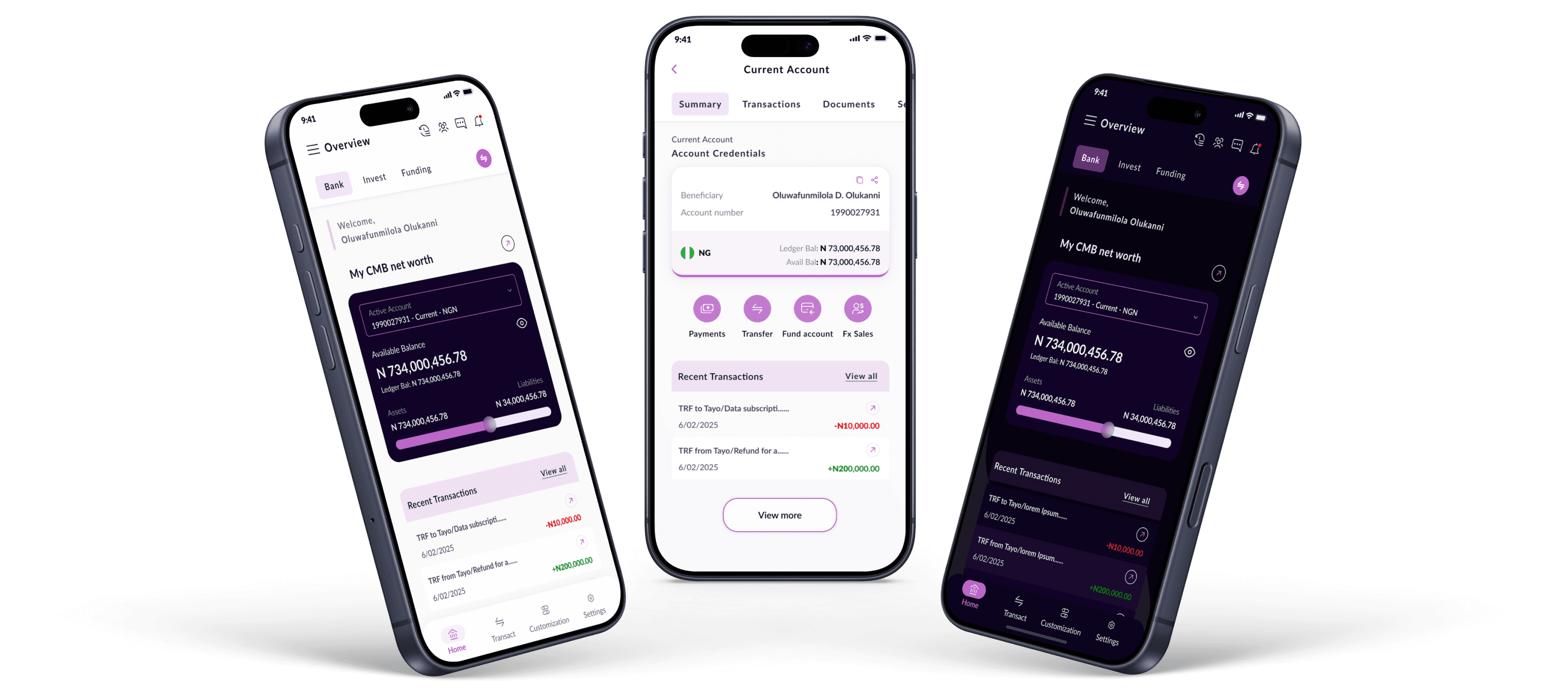
The redesigned home screen is built around the question: 'What does an HNIs customer need to know and do in the first 10 seconds of opening this app?' The design delivers this through a layered hierarchy: the primary account card (balance, account number, Assets/Liabilities bar) sits at the top with a hide/show privacy toggle. Below it, three a recent transactions feed, cards, and relationship manager details.
Rationale:
Research showed users needed to see their balance, see recent transactions, and get to their most common action fast, all without navigating away from the home screen.

Light (Theme)

Home (Dark Theme)
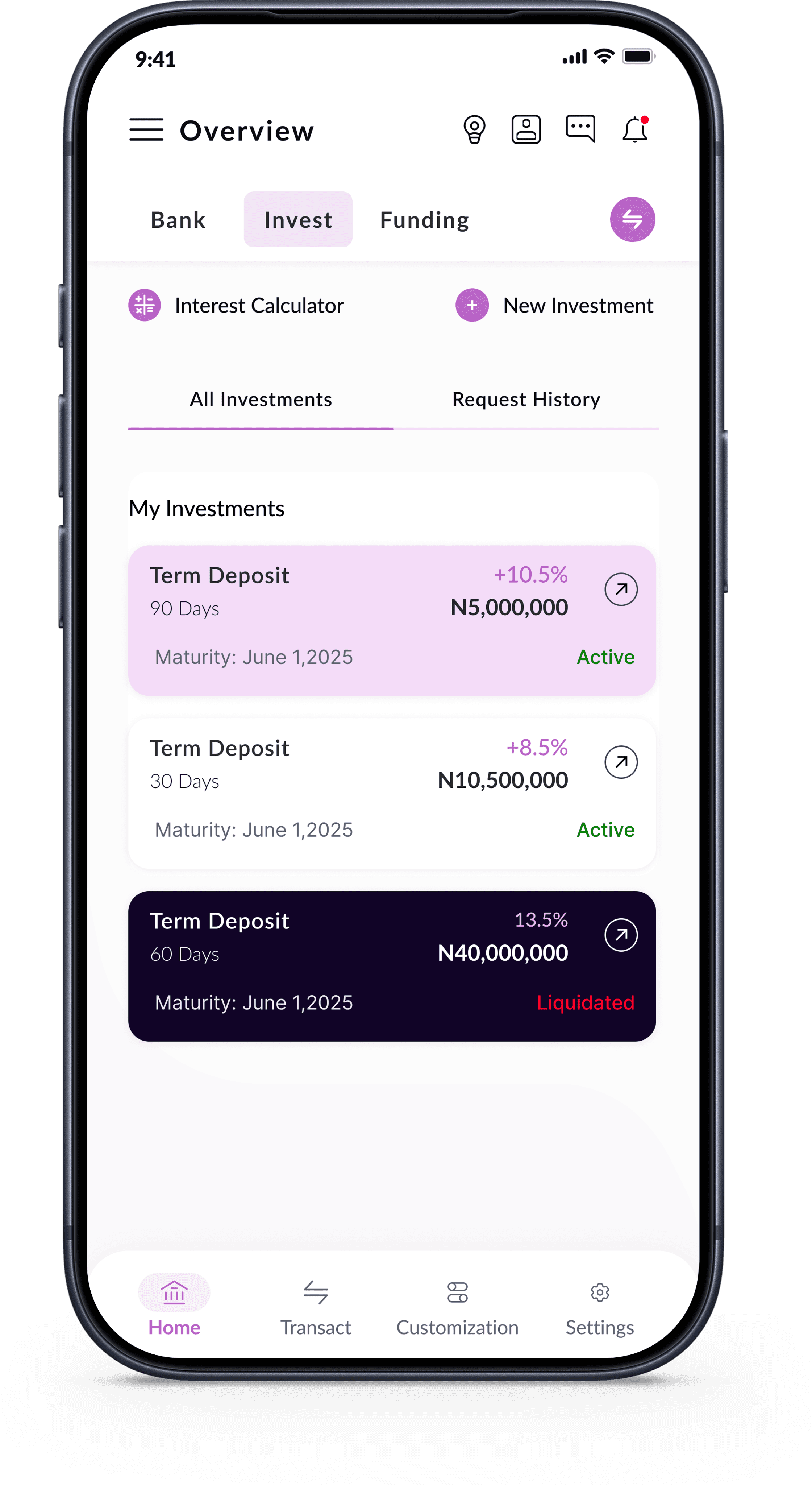
Investment(Dashboard)
2
The redesigned authentication experience makes biometrics the default, not an opt-in. On first login, after username and password authentication, users are immediately prompted to set up Face ID or fingerprint. On every subsequent launch, biometric authentication is the entry point; fast, secure, and invisible when it works. Password login or passkey remains available as a fallback.
Rationale:
The research was unambiguous, users who struggled with login frequently abandoned the app entirely. Reducing authentication friction was the single highest-impact change we could make to daily engagement.

Investment(Dashboard)

Light (Theme)
Login (Biometrics)
3
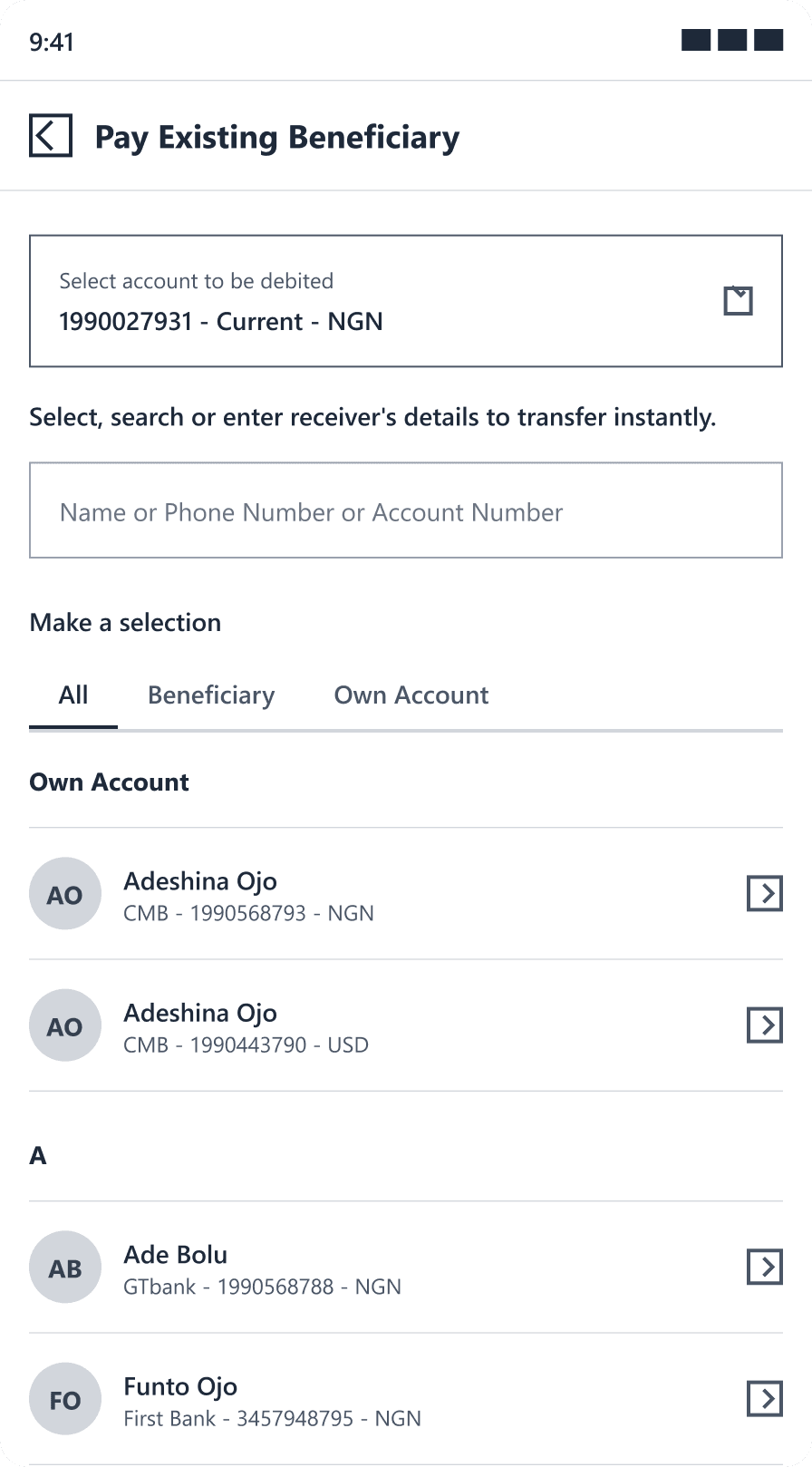
The redesigned transfer flow breaks the journey into discrete, manageable steps: (1) Select transfer type, (2) Choose or add recipient, select from suggested bank options (3) Enter amount and narration, (4) Review and confirm, (5) Authentication (Soft Token or PIN), (6) Success confirmation/Receipt. Each step has a single, clear purpose. At the confirmation step, every detail is displayed clearly before any authentication is requested.
Rationale:
Sending money is the highest-stakes interaction in a mobile banking app. The step-by-step flow reduced user anxiety, reduced errors, and provided clear feedback at every stage. The loop is definitively closed.

Transfer Type

choose or add receipt

suggested bank options

Amount & Narration

Summary
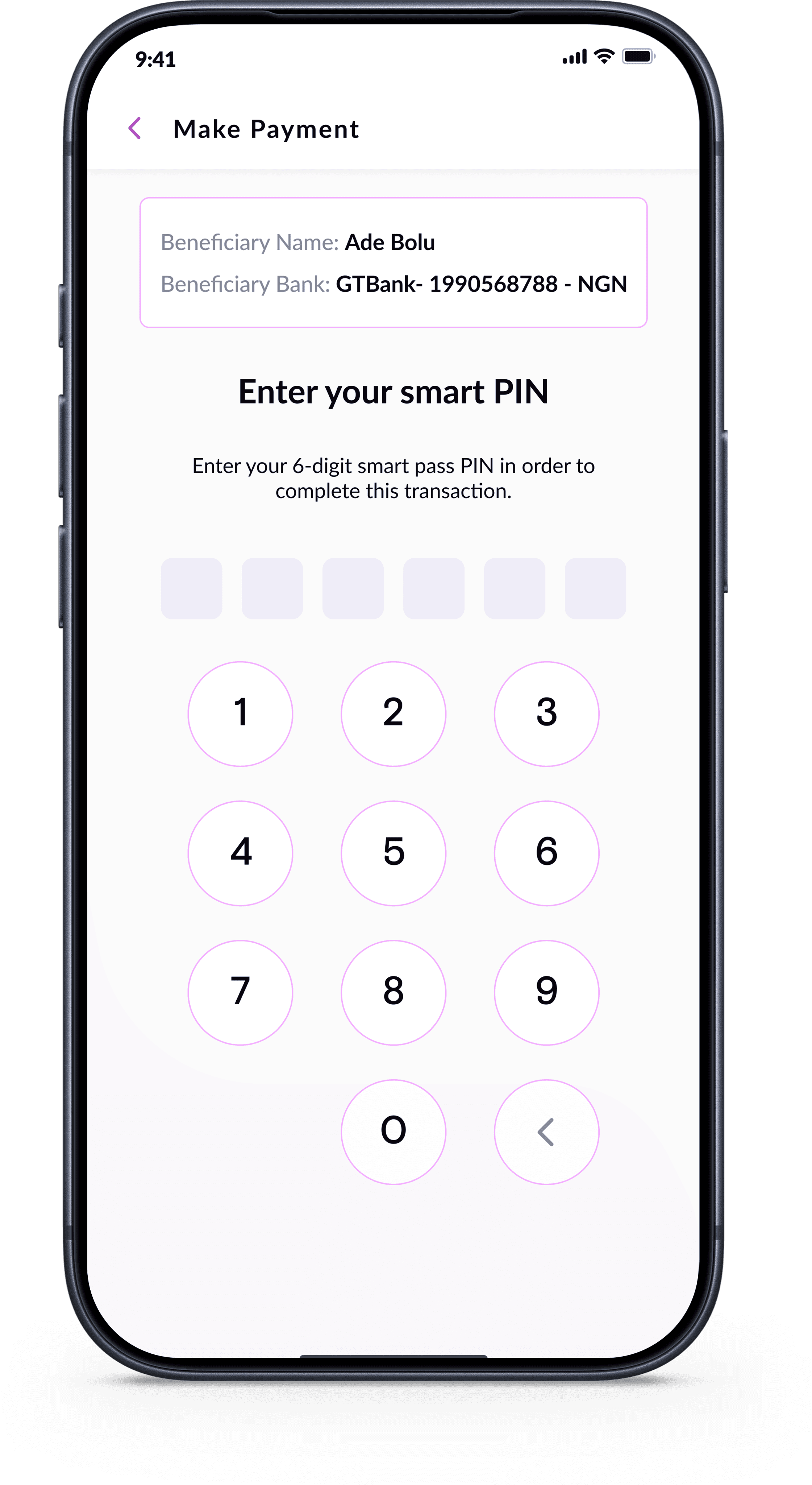
Authorize Payment
4
The redesigned card management section puts customers in control: activate, deactivate, block, unblock, set daily limits, view card transactions all immediately, all without a phone call. The card is displayed visually (showing last four digits, card type, and current status) making the interface feel premium and personalized.
Rationale:
Card management was one of the clearest self-service opportunities identified in research. Every call to customer service to block a card is a failure of the digital product.

Cards(Dashboard)

Card Settings

Set Card Limits
The transformation from legacy to modern mobile banking
Login / Authentication
BEFORE - OLD DESIGN

Old login - password-only with token management, no
biometrics, dated interface
AFTER - NEW DESIGN
New login - Biometric prompt, Passkey, Password,
clean modern interface
Home / Dashboard
BEFORE

Old home - No account list/dropdown, no financial overview, no quick actions,
dated green/black colour scheme
AFTER
New home - Account card, privacy toggle, quick actions, recent
transactions, card overview
Transfer
BEFORE

Old transfer - The single flow
AFTER

New transfer - The step-by-step flow
Features that did not exist in the previous app now fully self-service
Onboarding & Registration
Self-service registration with KYC document upload, account linking, and guided first-login experience


Notifications & Alerts
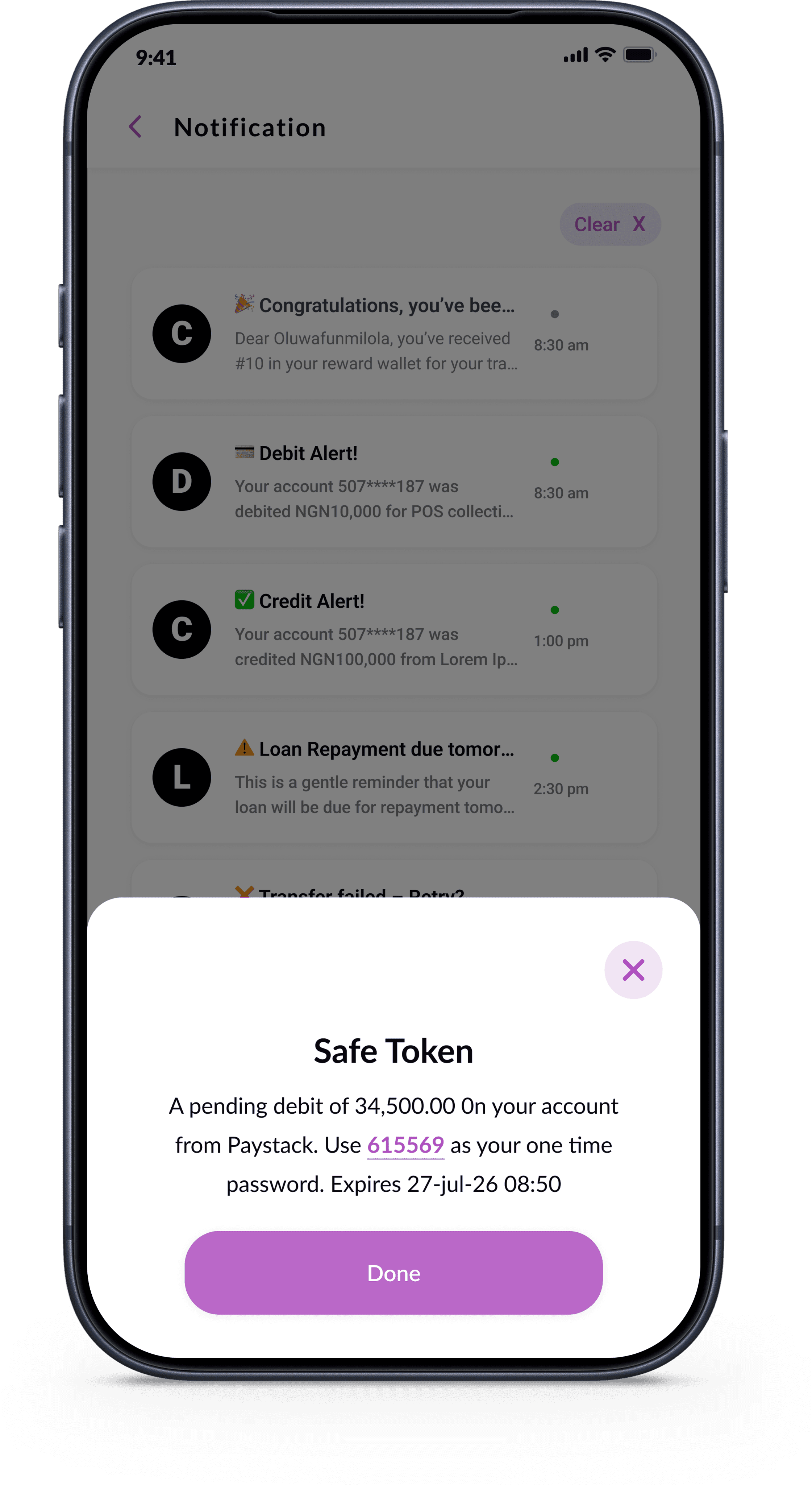
Push notifications and in-app alerts for transactions, login events, scheduled payment reminders
Self-Service Requests
Reference Letter requests, Hard Token request, cheque Book Request,Account Linking & Delinking request all trackable in real time


Customer Support
Live chat, support ticketing, feedback forms, FAQs, and direct RM contact
Report & Analysis
Spending analytics, income vs. expenses, monthly trends, and financial statistics


1
iOS and Android are different platforms with different interaction paradigms, different safe area rules, different navigation conventions, and different user expectations. The challenge was designing a product that felt native and correct on both platforms while maintaining a unified CMB brand identity.
Solution:
My approach was to design the core experience as platform-agnostic, then apply platform-specific refinements as a layer on top. The core layouts, the information hierarchy, and the interaction flows were identical. The platform-specific touches, bottom sheet behaviour, haptic feedback patterns, button styles, safe area handling were applied as variants within the component system.
2
This project ran concurrently with the CMB Internet Banking web platform redesign two major products, one designer, one timeline. Managing design coherence across both platforms while respecting their different natures required constant context switching and careful design system governance.
Solution:
The mobile design system was deliberately built to be compatible with the web system shared color tokens, shared component naming conventions, shared brand language while having its own mobile-specific component set.
3
The May 2025 MVP 1 deadline was firm, the app was committed to going live on both stores by that date. This created real pressure on the design process: decisions that would ideally have been validated through another round of user testing had to be made on the basis of research insight and design judgement.
Solution:
The team mitigated this risk through rigorous internal design reviews, close collaboration between design and development to catch issues early, and a commitment to a rapid post-launch iteration cycle.
4
Perhaps the most invisible and most important design challenge was building trust into the app at the level of individual interactions. Trust in a banking app is not designed into a single screen; it is earned through hundreds of small moments.
Solution:
Every loading state, every error message, every empty state, every confirmation screen was designed with the question: does this help the user feel confident that their money and their data are safe?
2 MPVs
Launched May & Dec 2025 on time
2
Platforms - iOS & Android simultaneously
+75%
Adoption rate, strong customer onboarding
Positive
Positive reception from staff and customers
Measurable Impact
Strong adoption by existing customers migrating to the new app on both stores
Customers and staff described the app as "intuitive", "modern", and "premium"
Reduction in support calls for basic self-service tasks
Post-launch feedback actively triaged into MVP 3 roadmap
"The app finally looks like it belongs to a premium bank. The experience is smooth and intuitive, I haven't needed to call customer service once since switching to the new app."
Retail Banking Customer - Post-Launch Feedback
"As a staff member, I'm proud to recommend this app to customers now. It used to be embarrassing to tell them to use the mobile app. Not anymore."
CMB Staff Member - Internal Feedback
"The biometric login alone has changed how I use the app."
Affluent Banking Customer - Post-Launch Feedback
What Worked Well
Biometric-first design the single decision with the highest observed impact on daily engagement
Building a mobile design system early enabled faster screen production
Step-by-step transfer flow reduced user anxiety and errors
Parallel iOS/Android design discipline using a single system with platform variants
Close developer relationship, frequent sync calls meant fewer implementation surprises
What I Would Do Differently
More structured usability testing before launch timeline pressure limited formal testing
Earlier dark mode scoping building it from day one rather than retrofitting would have been more efficient
A richer post-onboarding empty state better guided first-run experience
MVP 1 & 2 established the foundation. The roadmap ahead is substantial and confirmed each feature informed by post-launch customer and staff feedback:
MVP 3 & beyond - In Design
Life style Support
Dispute Resolution
Daily Limit Management
Advanced Investment Booking
In-App Chatbot
Account Funding
Rewards
Bill Split Feature
AI-Powered Spending Insights
Full Loan Self-Service
Role
Lead Product Designer
Timeline
Feb– Dec 2025 (MVP 1 & 2)
Platform
iOS & Android
Users
Retail Customers
© 2026 Oluwafunmilola Olukanni. All rights reserved.
Senior Product/UXUI Designer · Lagos, Nigeria