
Mobile Banking
B2C
Retail
UX Research
UXUI Redesign
MVP Launched
Role
Lead Product Designer
Timeline
Feb– Dec 2025 (2 MVPs)
Platform
iOS & Android
Users
Retail Customers
2 MPVs
Launched May & Dec 2025 on time
2
Platforms - iOS & Android simultaneously
+75%
Adoption rate, strong customer onboarding
Positive
Positive reception from staff and customers
But every time Adaeze opens the CMB mobile app, the experience chips away at her confidence in the app and, by extension, in the bank. The login feels outdated. The home screen is overwhelming. Transfer involve too many errors with too little feedback. She has called customer service twice to complete transactions she should have been able to do herself in under a minute. She has started checking he competitors' apps, wondering if the grass really is greener.
Core pain points
App crashes during login and transfers
No biometric authentication
Confusing information architecture
No holistic financial overview
Almost no self-service capability
Business impact
Overloaded relationship managers
High call-centre volume for basic tasks
Customers comparing competitors' apps
Brand perception lagging peers
Growing churn risk among HNIs
"I sent money and wasn't sure if it went through. I had to call the person I sent it to just to confirm. A bank app should never make me feel that way.
Private Banking Customer - Interview
Coronation Merchant Bank Old Mobile Designs

Old login - password-only with token management, no
biometrics, dated interface

Old home - No account list/dropdown, no financial overview, no quick actions,
dated green/black colour scheme

Old transfer - the single flow
The App Store Told the Story
Research began with months of App Store and Google Play review analysis a direct, unfiltered signal of real user frustration. This was followed by customer interviews across Affluent and Private Banking segments, stakeholder discovery sessions with business unit heads, and synthesis of existing feedback data. The convergent insight that shaped every design decision: the problem was not missing features, it was trust destroyed by unreliable micro-interactions.
"I can't sign up it keeps saying my credentials are invalid whereas I already inputed my details correctly I don't like this at all"
Google Play Review - 1 star
"The experience has been very poor for new users like me. I can't sign up for over 1 month. The app keeps on asking me to accept terms and conditions. Meanwhile, there is no check box to tick in acceptance"
App Store Review - 1 stars
"Can someone please fix this app? The UI looks like it was designed in 2010"
App Store Review - 2 stars
The insight from this research became a north star for the redesign: every interaction needed to close the loop. Every action needed clear, immediate, unambiguous feedback. Trust is built, one micro-interaction at a time.
Close Every Loop
Every action must have clear, immediate feedback. No ambiguity about whether something worked.
Fewer Taps, More Done
The most common tasks check balance, send money, pay bill should be completable in the fewest possible steps.
A Bank You Can Trust Visually
The visual language must communicate premium, modern, and reliable. If the app looks like it belongs in 2015, customers will assume the bank does too.
Financial Clarity at a Glance
The home screen should answer the three questions every customer has the moment they open the app: How much do I have? What's come in and gone out? What do I need to do?
Biometric First
Authentication should be invisible when it's working correctly. Biometrics are the default; passwords are the fallback.
Information Architecture
The process began with a full mobile information architecture every screen, every navigation path, every entry and exit point before a single UI was touched. Seven critical user flows were mapped next. Wireframes tested three home screen density levels and two transfer flow approaches before moving to high-fidelity design. A mobile-specific Figma design system covering 60+ screens was built with semantic colour tokens, WCAG AA contrast compliance, 44pt minimum touch targets, dark mode architecture, and safe area handling for both iOS and Android.

Wireframing: Thinking Before Colouring
Bottom navigation vs. hamburger menu
Research strongly indicated that bottom navigation wins on mobile for banking apps. Users don't want to remember where features live; they want them visible at all times. The hamburger menu was used to incorporate more menu or features.
Home screen density
I tested three layouts: minimal (balance only), medium (balance + recent transactions + quick actions), and rich (full financial overview). The medium density tested best it answered the user's immediate questions without requiring scrolling to start.

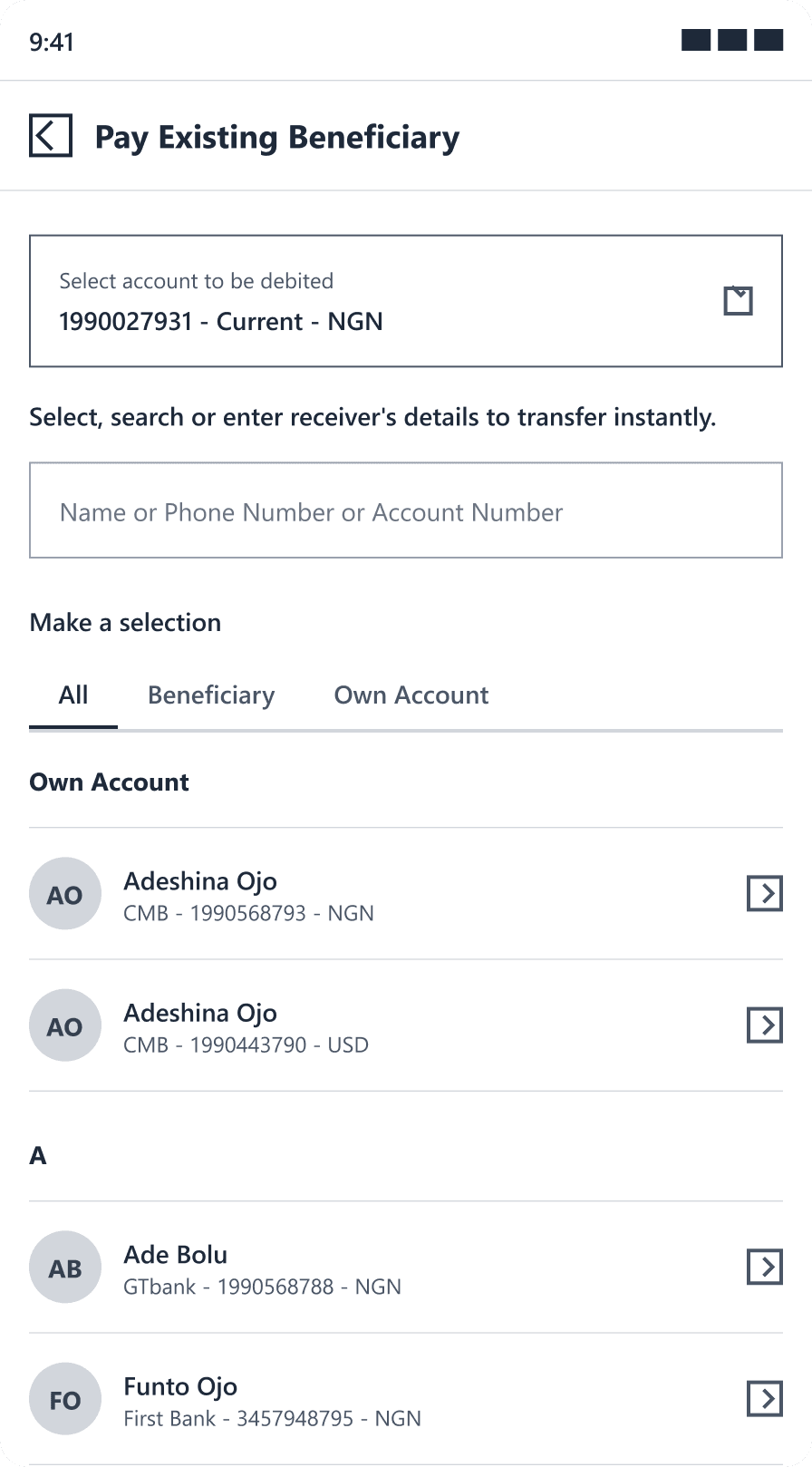

Transfer flow: single screen vs. step-by-step
The step-by-step won decisively: it reduced cognitive load, made errors easier to catch before submission, and allowed better in-progress feedback at each stage.
1
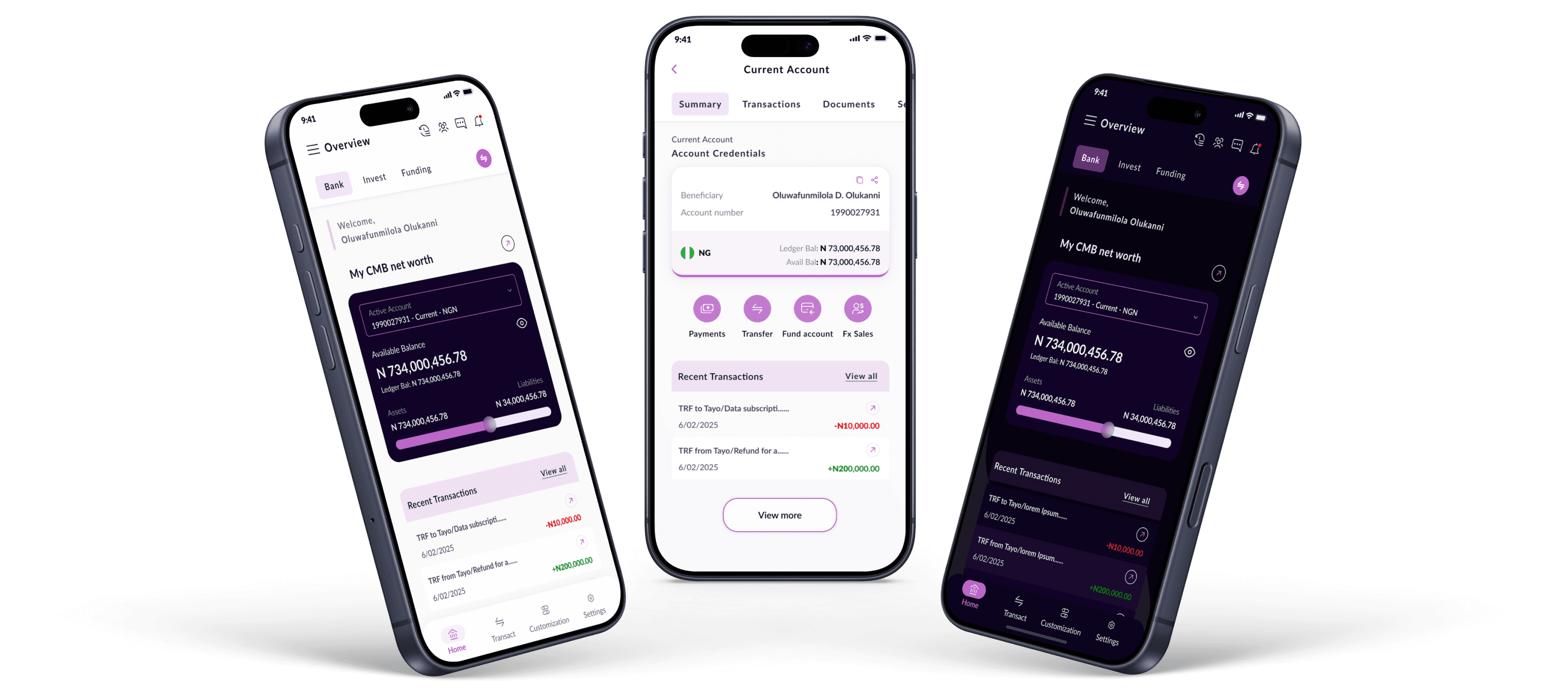
The home screen answers three questions in 10 seconds: how much do I have, what's moved, and what do I need to do next. Primary account card with live balance and privacy toggle sits at the top, followed by recent transactions, card overview, and relationship manager details. Medium density tested best over minimal and rich layouts.

Light (Theme)

Home (Dark Theme)
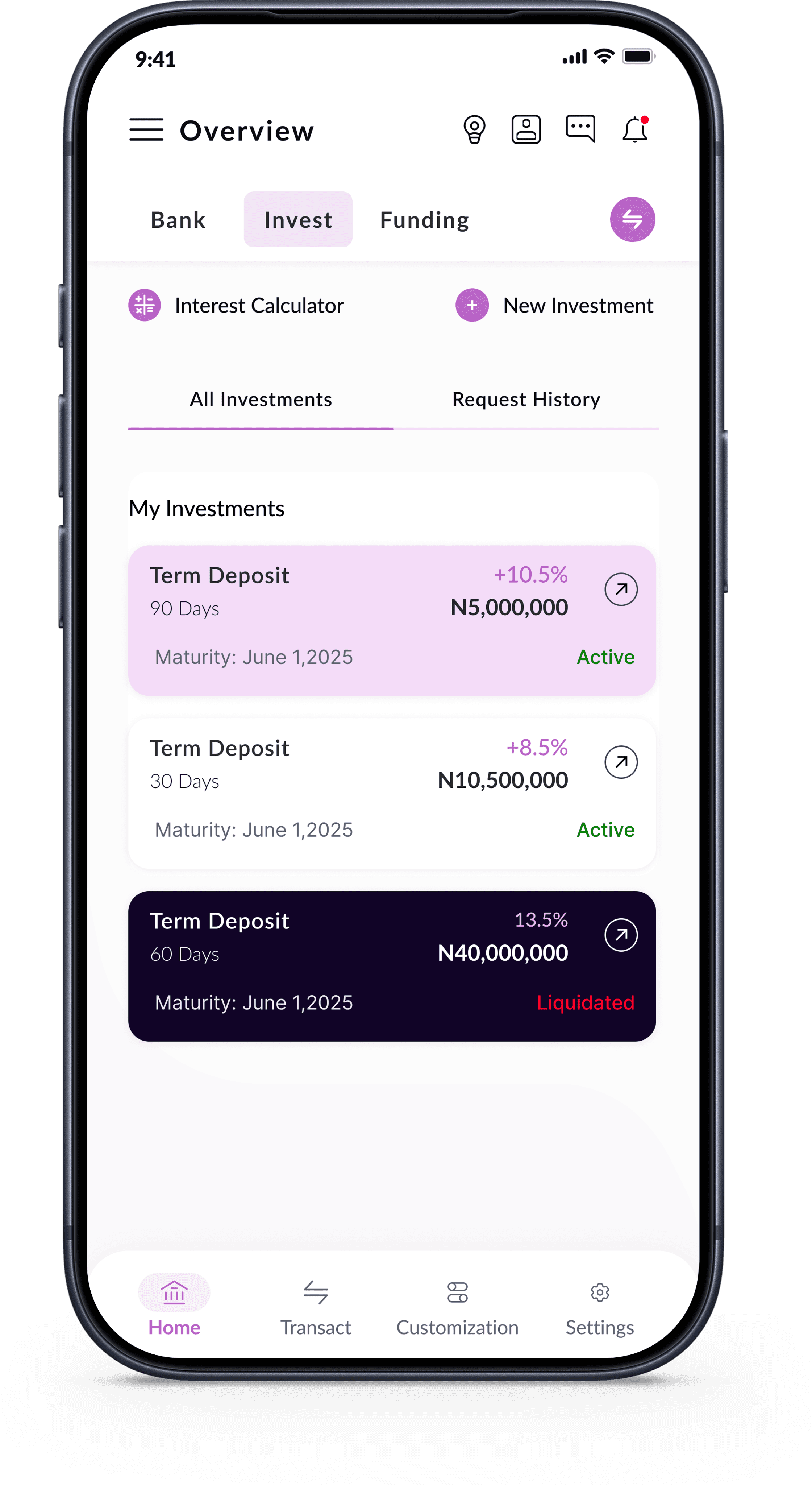
Investment(Dashboard)
2
Biometrics are the default entry point not an opt-in setting. After initial password setup, users are immediately prompted to enable Face ID or fingerprint. Research showed authentication friction was the single highest-impact driver of daily disengagement; solving it was the highest-ROI design decision on the entire project.

Investment(Dashboard)

Light (Theme)

Login (Biometrics)
3
Six discrete steps select type, choose recipient / enter account number, enter amount, review, authenticate, confirm each with a single clear purpose. The confirmation screen shows every detail before any authentication is requested. Decisively closed the trust loop that the old single-screen flow broke repeatedly.

Transfer Type

choose or add receipt

suggested bank options

Amount & Narration

Summary
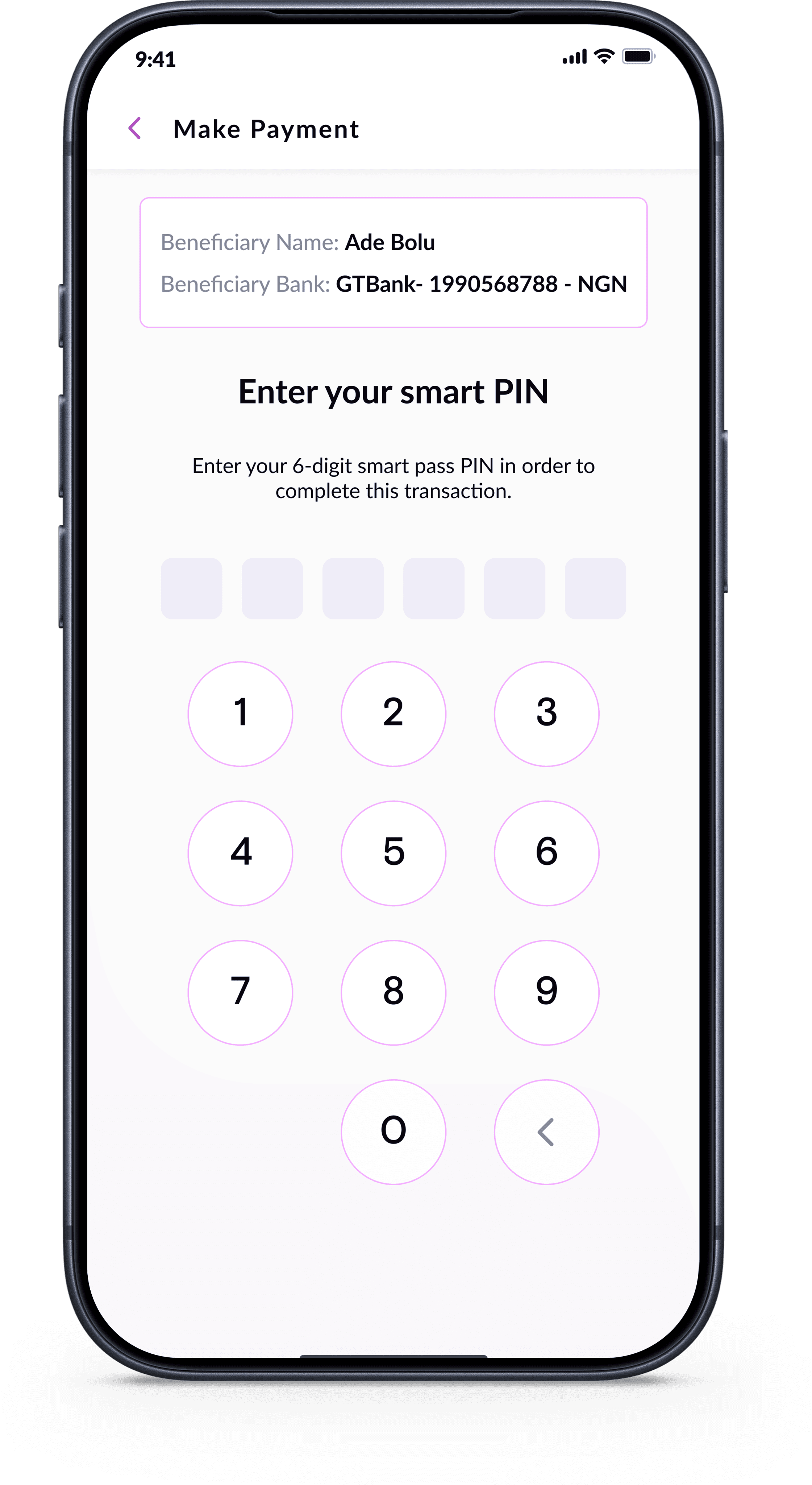
Authorize Payment
4
Full card self-service activate, deactivate, block, set daily limits, view transactions all without a phone call. Designed around the principle that every call to customer service to block a card is a product failure, not a service success.

Cards(Dashboard)

Card Settings

Set Card Limits
1
Core layouts and flows were platform-agnostic; iOS and Android-specific refinements (bottom sheets, safe areas, haptics) were applied as component variants on top.
2
Both products ran concurrently with one designer. Shared colour tokens and naming conventions kept the systems compatible while each had its own platform-specific component set.
3
Firm May 2025 deadline required design judgement over formal testing rounds. Risk mitigated through rigorous internal reviews and a committed post-launch iteration cycle.
4
Every loading state, error message, and empty state was designed with one question: does this help the user feel their money is safe?
Both MVP 1 (May 2025) and MVP 2 (Dec 2025) launched on time, live on the App Store and Google Play.
Measurable Impact
Strong adoption by existing customers migrating to the new app on both stores
Customers and staff described the app as "intuitive", "modern", and "premium"
Reduction in support calls for basic self-service tasks
Post-launch feedback actively triaged into MVP 3 roadmap
"The app finally looks like it belongs to a premium bank. The experience is smooth and intuitive, I haven't needed to call customer service once since switching to the new app."
Retail Banking Customer - Post-Launch Feedback
"As a staff member, I'm proud to recommend this app to customers now. It used to be embarrassing to tell them to use the mobile app. Not anymore."
CMB Staff Member - Internal Feedback
What Worked Well
Biometric-first design the single decision with the highest observed impact on daily engagement
Building a mobile design system early enabled faster screen production
Step-by-step transfer flow reduced user anxiety and errors
Parallel iOS/Android design discipline using a single system with platform variants
Close developer relationship, frequent sync calls meant fewer implementation surprises
What I Would Do Differently
More structured usability testing before launch timeline pressure limited formal testing
Earlier dark mode scoping building it from day one rather than retrofitting would have been more efficient
A richer post-onboarding empty state better guided first-run experience
© 2026 Oluwafunmilola Olukanni. All rights reserved.
Senior Product/UXUI Designer · Lagos, Nigeria