
Corporate Banking
B2C
Retail
B2B
UX Research
Feature Module
Virtual Accounts
Accounts in Control
Accounts in Control
Designing the Payment Tags Account System for Coronation Merchant Bank turning a spreadsheet-dependent corporate workflow into a secure, real-time virtual account management portal.Bank
Role
Lead UX/UI Designer
Timeline
6 Weeks (Jan–Feb 2026)
Platform
Web (Responsive)
Scope
B2B & B2C Corporate
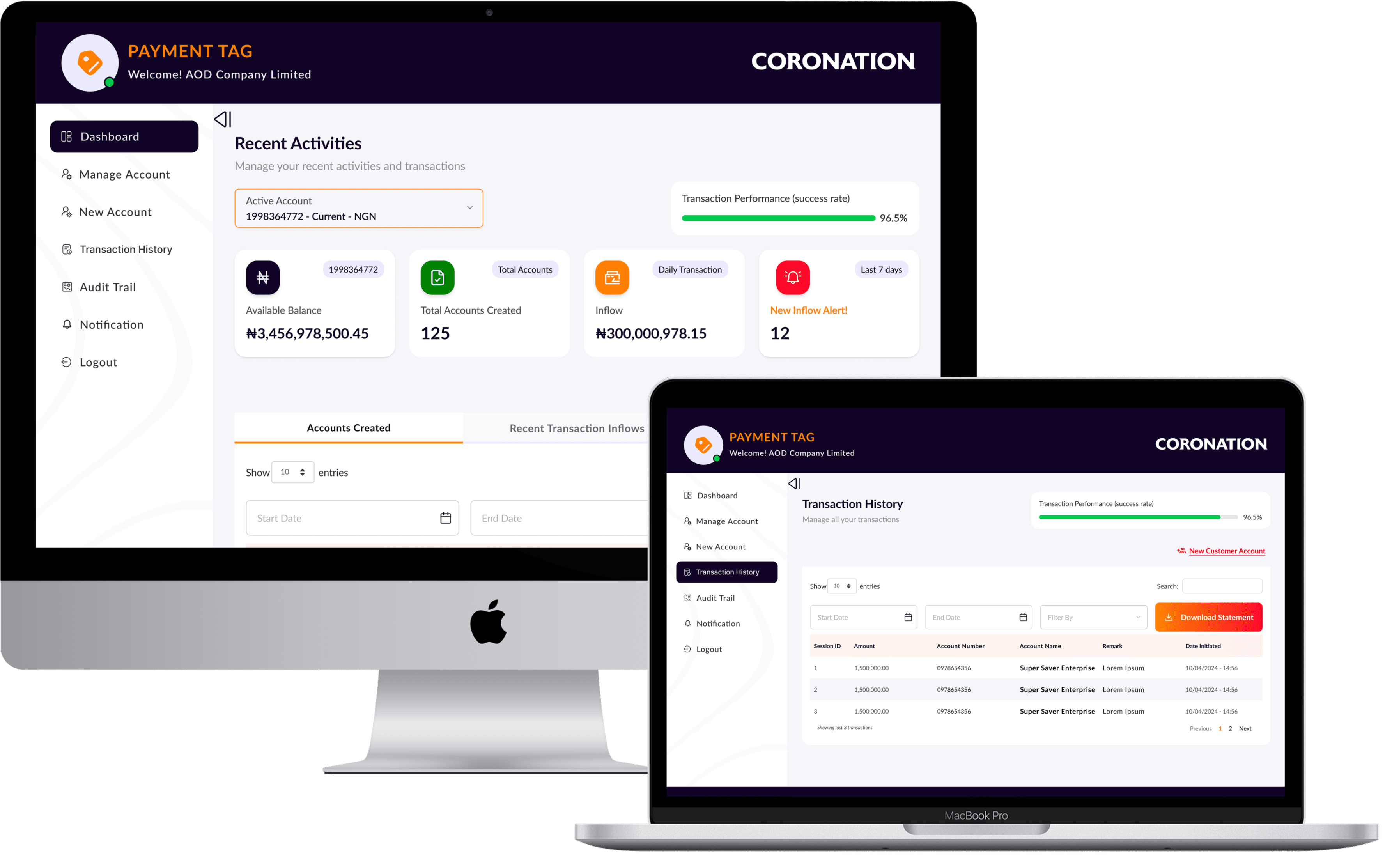
The Impact at a Glance
30%
Reduction in time managing customer transactions
+70%
Increase in efficiency for corporate clients
Fewer
Fewer support tickets via improved self-service
Higher
Higher trust through transparency & security
"We didn't just build a portal.
We eliminated the spreadsheet."
The Problem
CMB's corporate clients businesses managing hundreds of customer sub-accounts every month had no native tool to do it inside the bank's platform. Finance managers were building makeshift virtual account systems in Excel, manually reconciling them against CMB statement exports every morning. Hours of error-prone work that belonged inside a banking platform, not a spreadsheet. Every manual reconciliation was an operational risk: misposted transactions, missed inflows, compliance exposure.
"It's hard to track transactions across all our customers. We manage hundreds of sub-accounts in a spreadsheet."
- Corporate Finance Manager, User Interview
Core pain points
No virtual account creation in platform
Manual reconciliation against exports
No real-time inflow visibility
No audit trail or transaction search
Compliance errors from manual data entry
Business impact
High support overhead for basic requests
Corporate client churn risk
Relationship Managers overloaded
Regulatory exposure from manual processes
Platform perceived as behind competitors
Discovery & Research: Understanding Before Designing
The Research Sprint
A focused 2-week discovery sprint ran three research tracks simultaneously to make the most of a compressed 6-week timeline: stakeholder interviews with CMB Relationship Managers (operational bottlenecks and strategic goals), user interviews with corporate finance managers and operations teams (current workflows and mental models), and a system audit of the existing internet banking platform (design patterns, technical constraints, and integration points). The finding that changed everything was not about missing features, it was that users had already invented the solution themselves, just badly. Offline, in spreadsheets.
"We need better visibility into cash inflows and outflows. Right now we find out about problems after the fact."
- Operations Director, User Interview
I began with low-fidelity sketches physical pen on paper mapping different dashboard layouts, account creation flows, and transaction filtering patterns. This stage was deliberately rough. The goal was to explore information flows quickly without the friction of software, and to get ideas in front of the Product Owner and Relationship Managers for early validation.
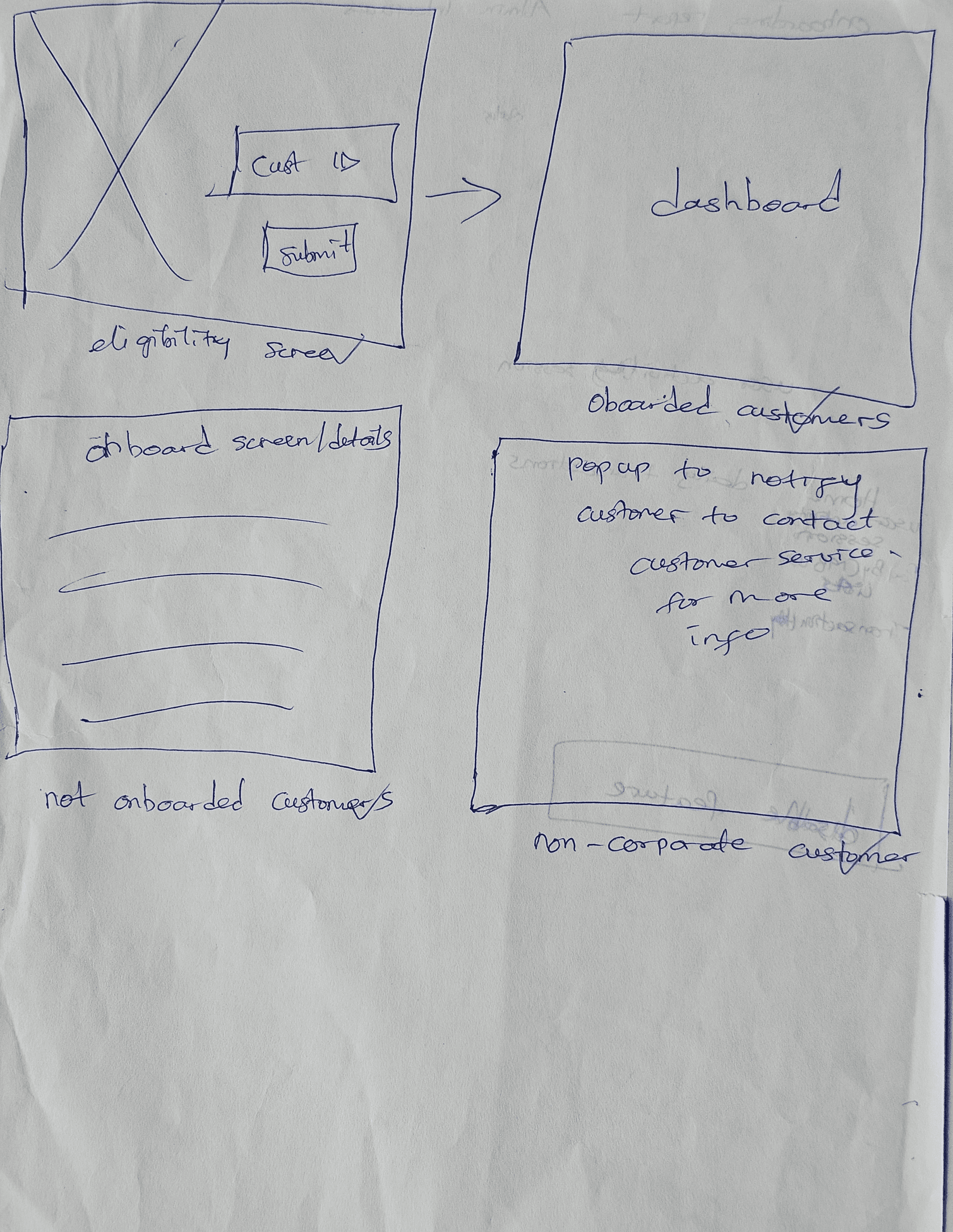
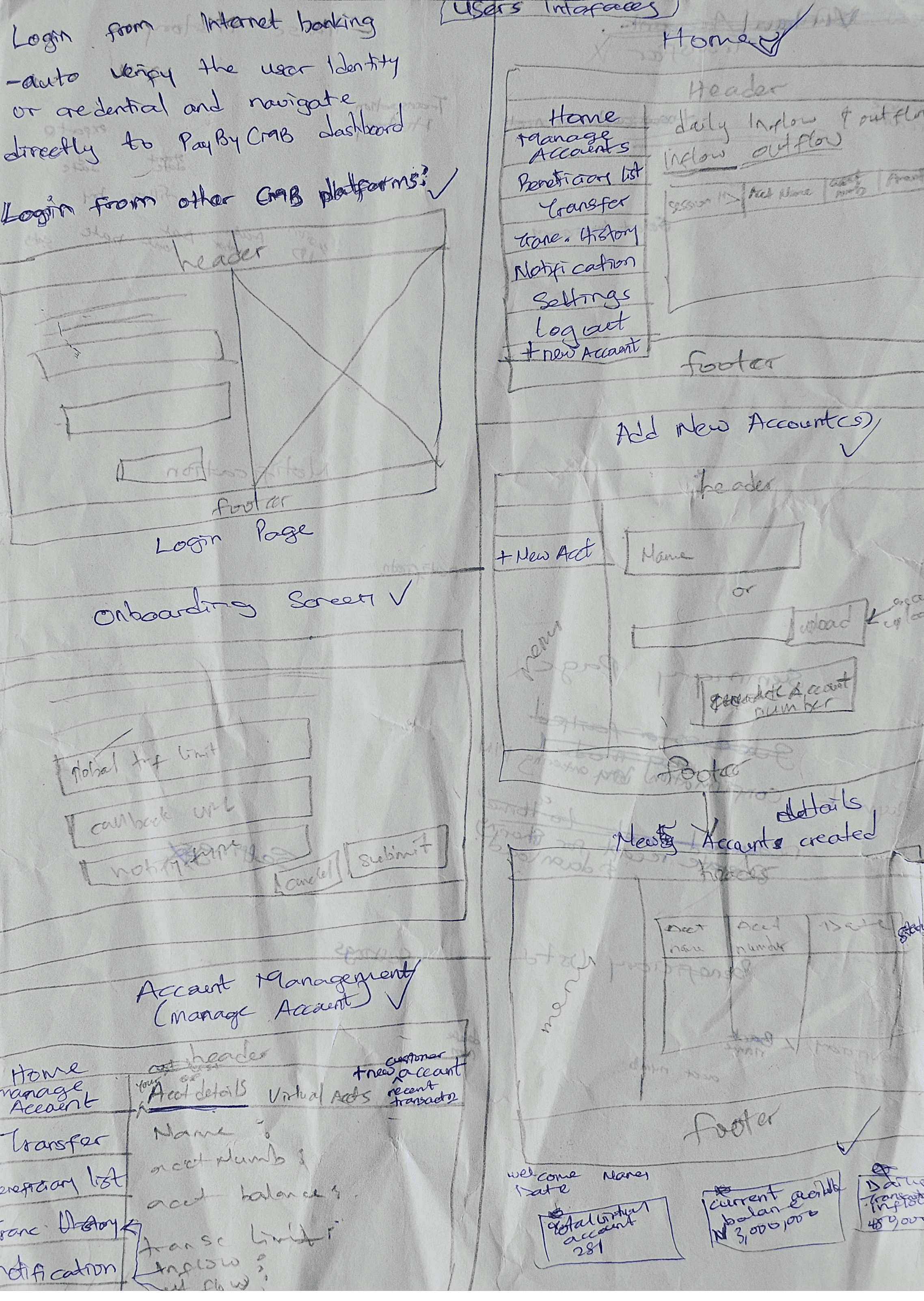
Sketches from discovery sprint
Design Principles for Payment Tags
Real-Time Over Retrospective
Every balance, transaction, and alert reflects the current state no waiting, no exports
Action-Oriented Dashboard
The home screen is not a report; it is a control panel. Everything surfaced should lead to a clear next action
Precision Filtering
Finance users work in specifics filter by account, date range, amount, and reference simultaneously
Security as Trust
Every data-changing action has a proportionate confirmation state secure without being paranoid
Design Process
Wireframing & Iteration
The process began with physical pen-on-paper sketches to explore dashboard layouts, account creation flows, and filtering patterns quickly and get ideas in front of the Product Owner and Relationship Managers before any digital work began. This validated structural direction before investing in Figma wireframes. Three specific design problems were resolved through structured wireframing and testing: the dashboard information hierarchy (what four questions must be answered in 10 seconds?), the account display model (table vs. cards), and the creation flow structure (single form vs. step-by-step wizard).
Problem 1: The Dashboard Information Hierarchy
What should a corporate user see the moment they log in? Research showed they needed to answer four questions instantly: What is my available balance? How many virtual accounts do I have? How much has come in today? Are there any alerts I need to act on? The solution was a 4-card metric strip at the top of the dashboard, Inflow (daily transaction total), and New Inflow Alert each card providing the answer to one of those four questions at a glance.
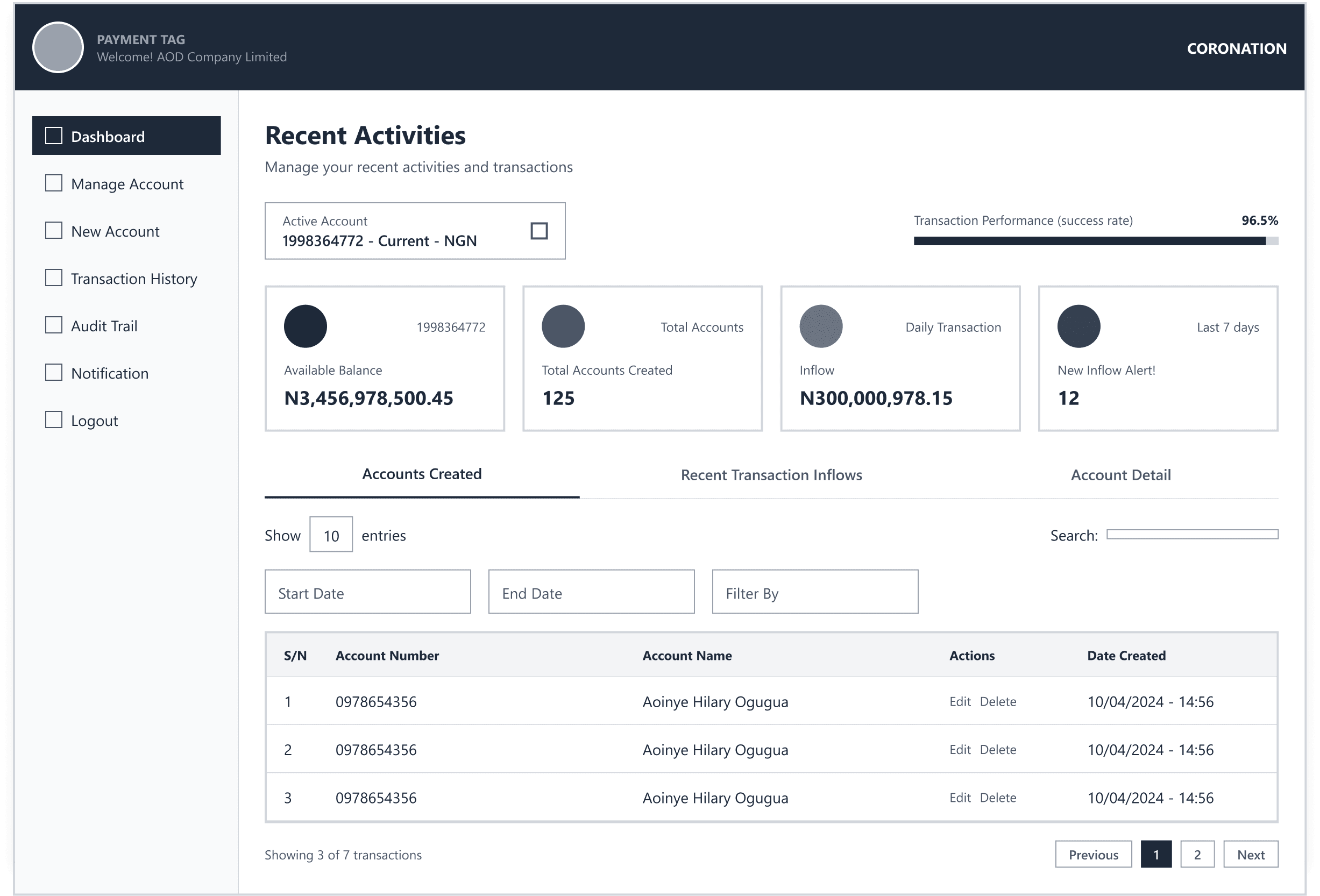
Proposed solution for dashboard
Problem 2: Account Table vs. Account Cards
I initially explored two approaches for displaying the list of virtual accounts: a card grid (visually richer, shows less at once) and a sortable data table (information-dense, familiar to finance users). Usability testing with a corporate finance manager resolved this quickly finance users preferred the table. They work with data. They know how to use columns, sort headers, and row actions. A table matched their mental model. The card view was deprioritized.
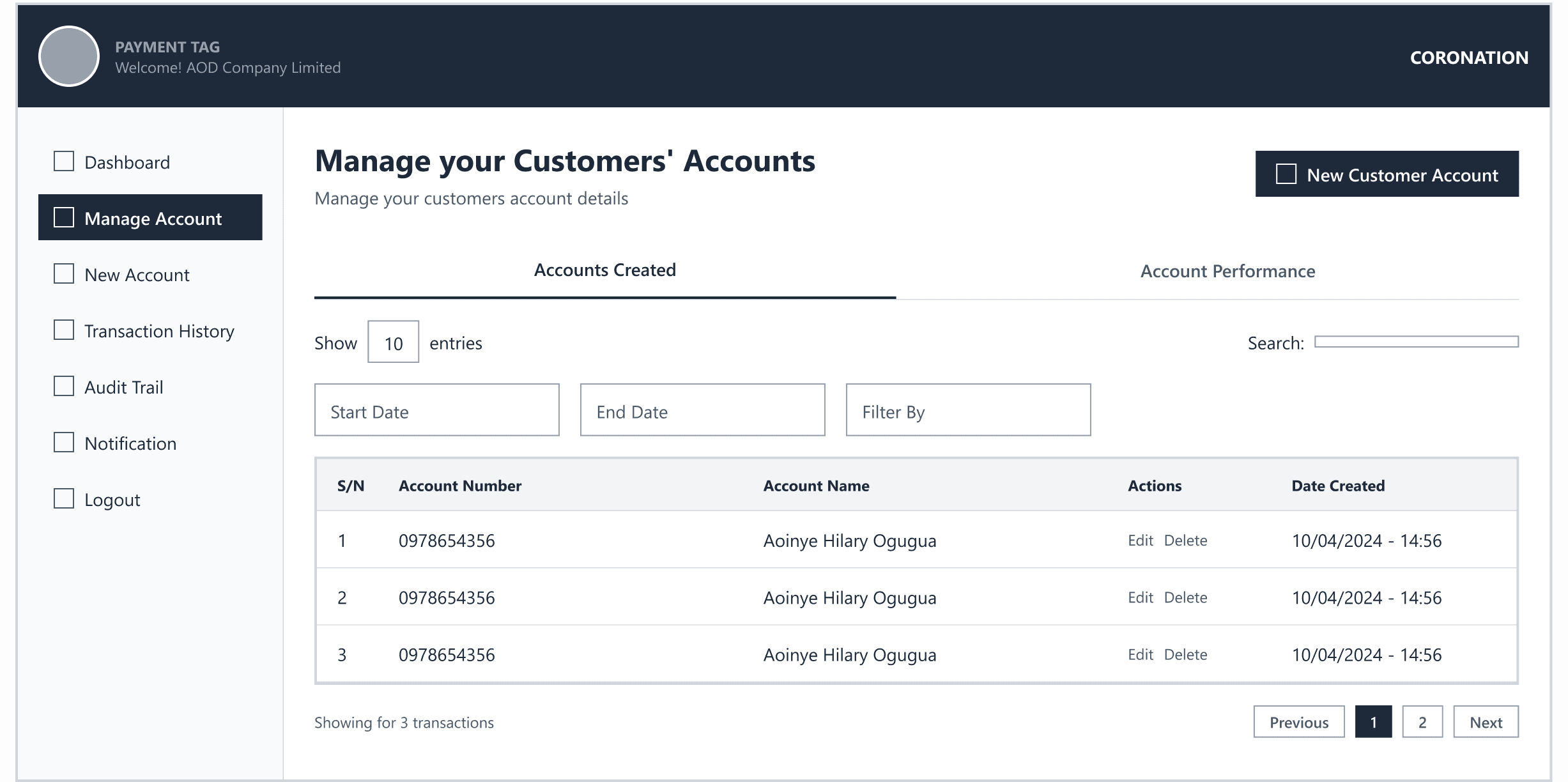
Proposed solution for account table vs account cards
Problem 3: The New Account Creation Flow
Creating a new virtual account required three pieces of information: a name, a customer ID(will be auto-generated in the database), and optionally a bulk file for mass account creation. A single long form felt risky errors were harder to catch and the form felt overwhelming.
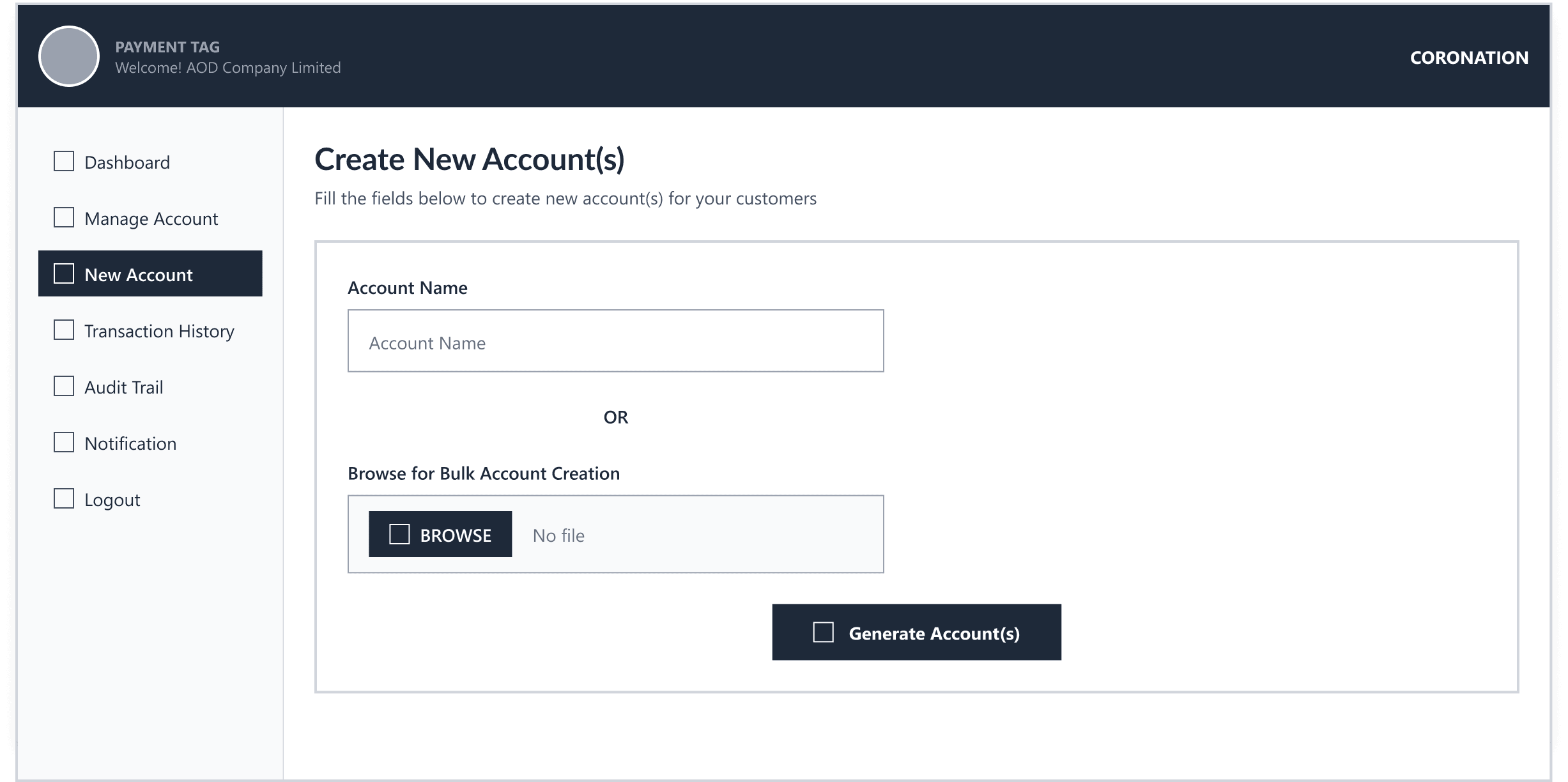
Proposed solution for new account creation flow
Usability Testing: Testing Before Building
We ran iterative usability tests on the portal's main screens throughout the design phase not just at the end. This rapid feedback loop, within a 6-week timeline, here’s how specific improvements evolved:
Three testing objectives:
Do users prefer seeing real-time balances per virtual account upfront or is a summary sufficient?
Is a step-by-step 'Create Virtual Account' wizard more intuitive than a single long form?
What filters do users need at the transaction level to make the data actionable?
The results were clear:
Real-time balances per virtual account upfront - users preferred this strongly. Seeing the balance on the account list meant they could assess their portfolio without drilling down
The wizard approach won over the single form - by a significant margin. Users described the wizard as 'less stressful' and 'clearer'
Flexible multi-criteria filtering was essential - users wanted to filter by account, date range, amount, and customer reference simultaneously
Onboarding: Customer Verification Screen
BEFORE
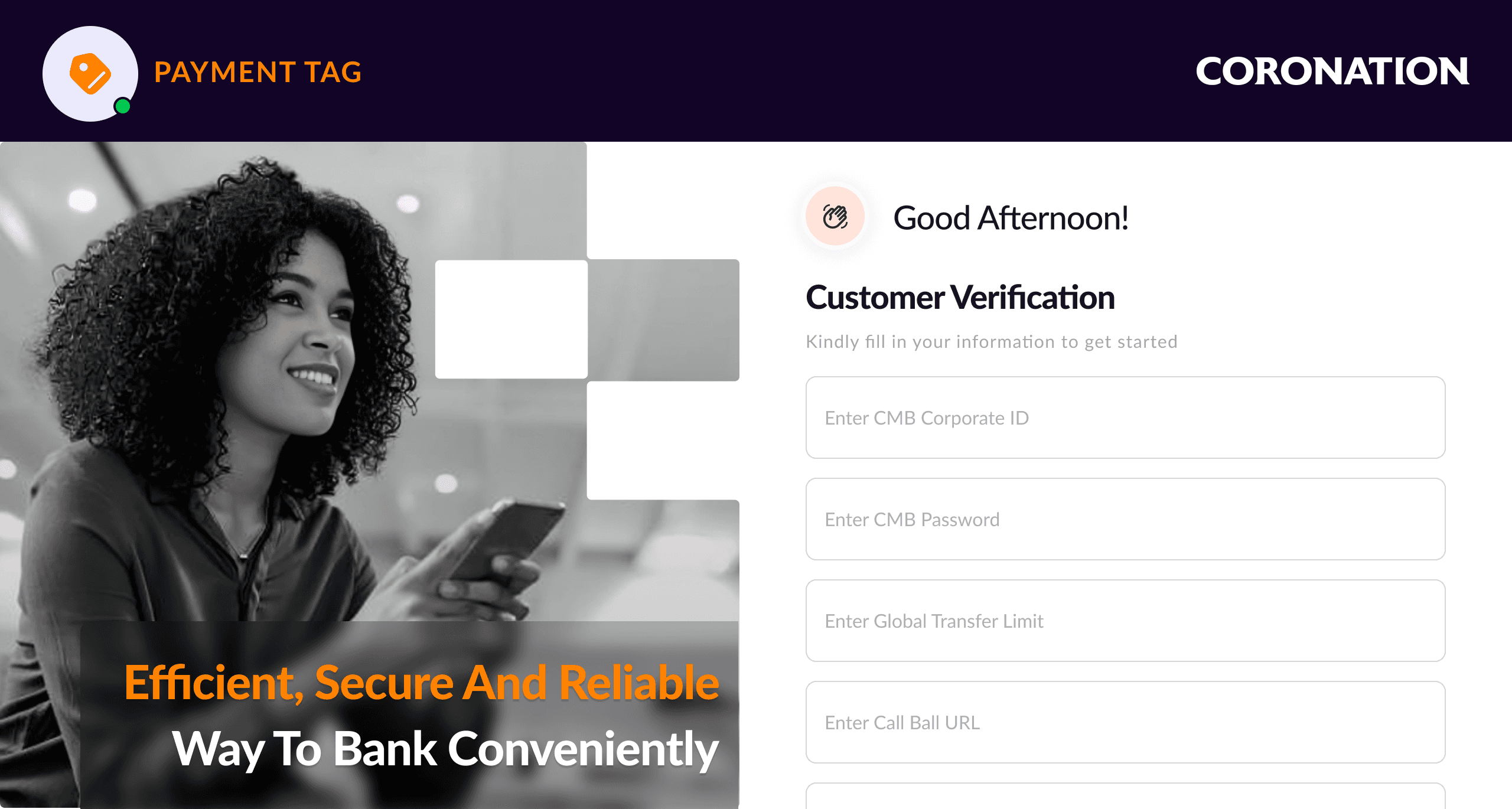
Single long form
AFTER
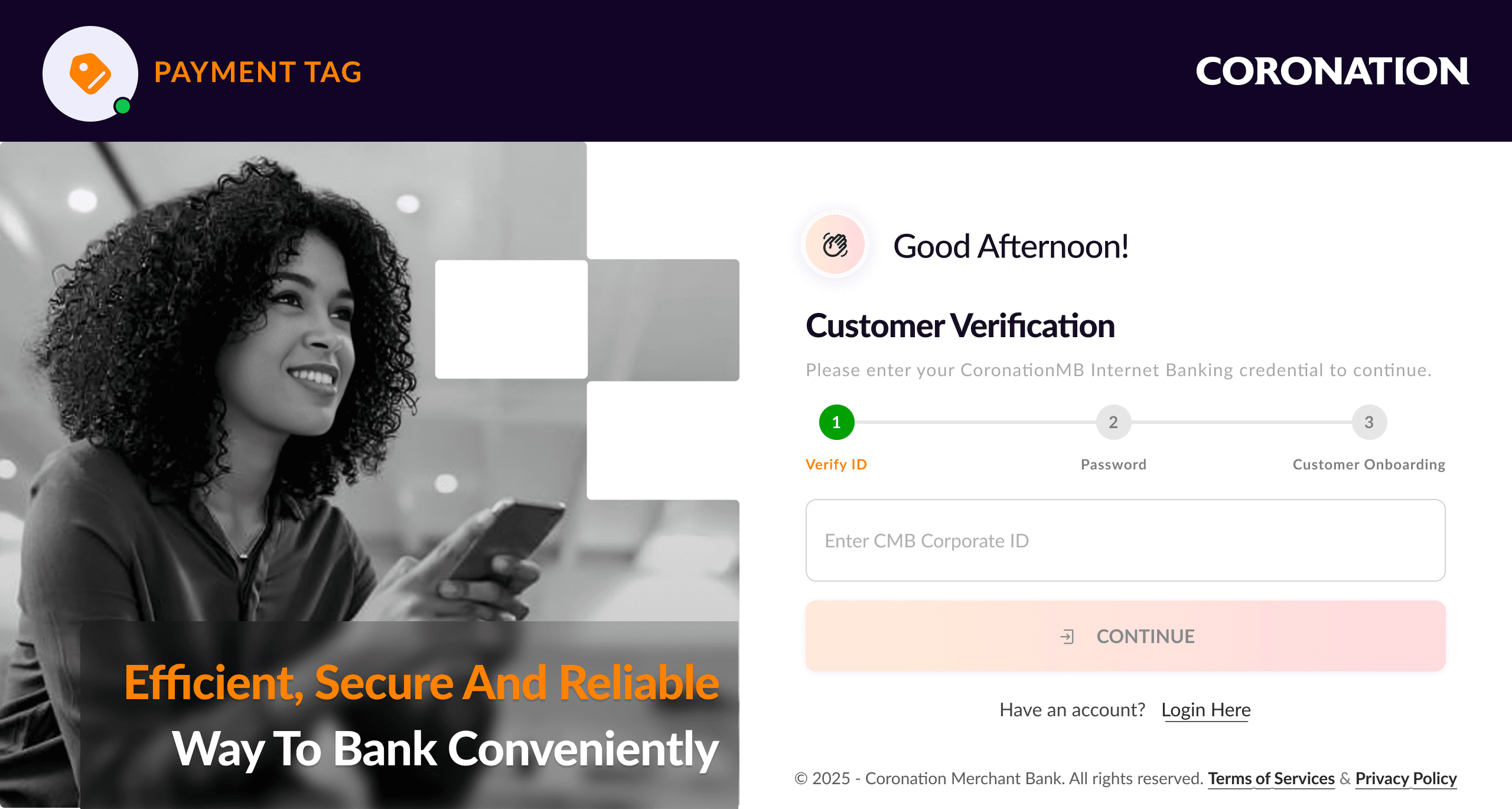
Step-by-step wizard
Dashboard Landing Screen
BEFORE
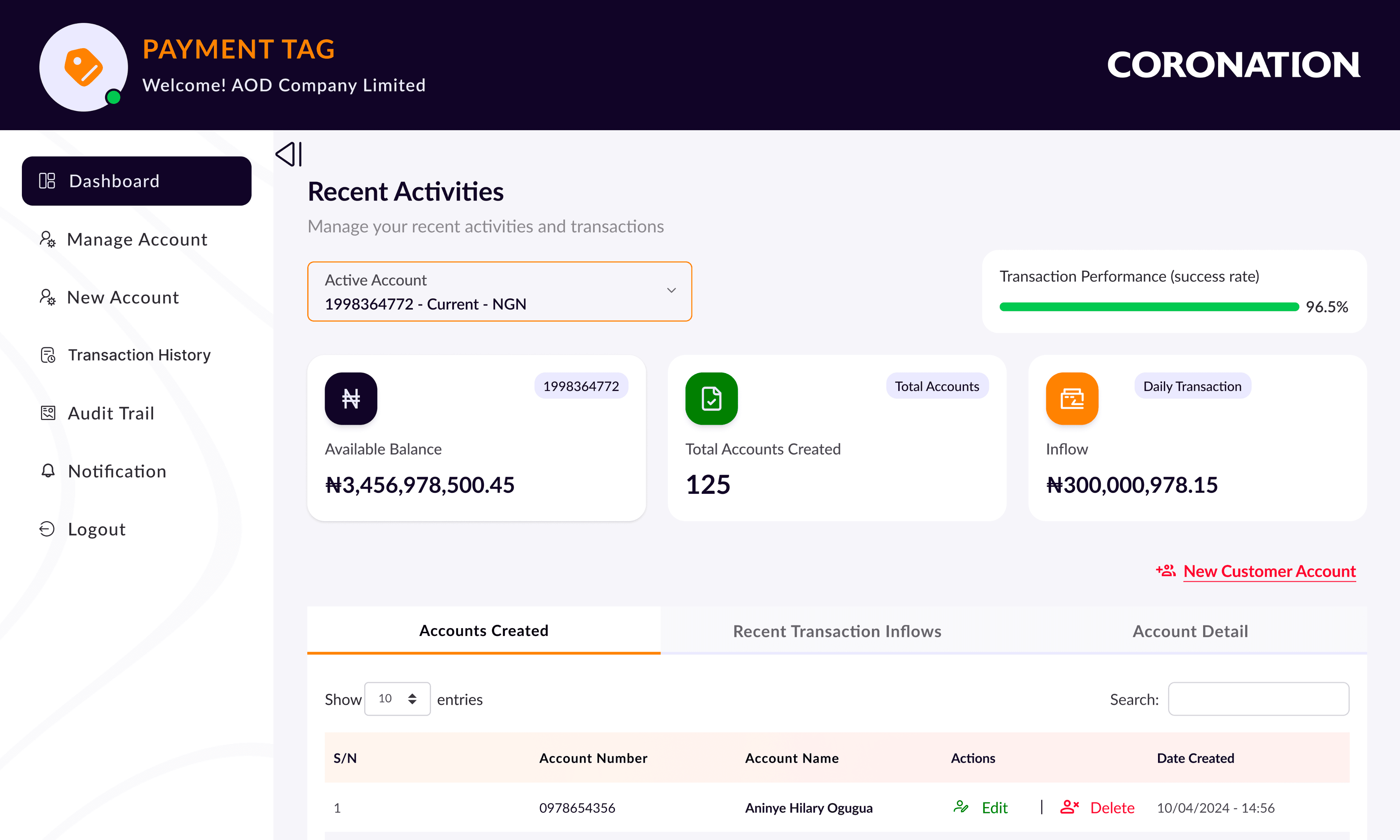
No real-time inflow, alert & balances with flexible filter
AFTER
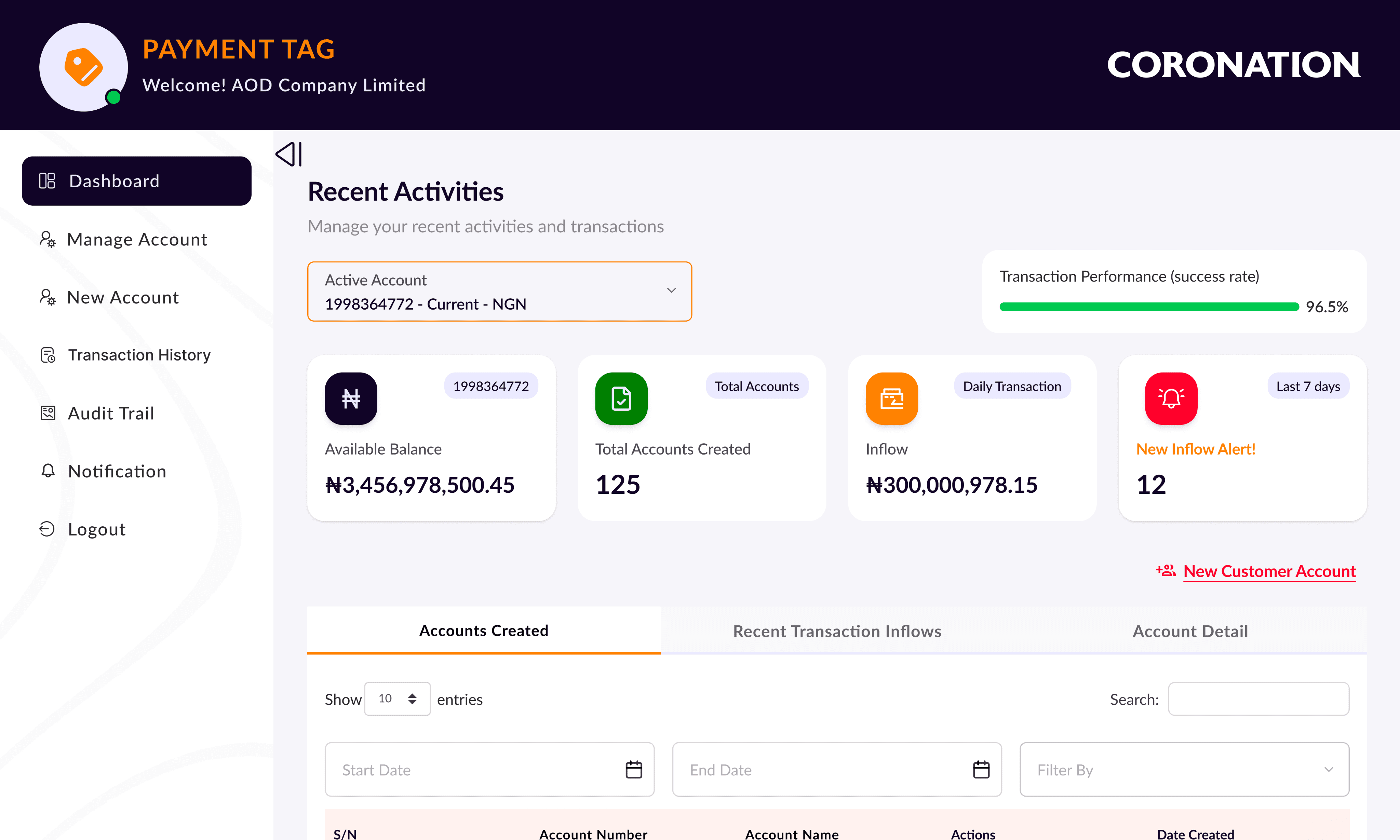
Real-time inflow, alert & balances with flexible filter
Key Design Decisions & Rational
Decision 1: Integrated module, not standalone product (Strategic)
Payment Tags was designed as a module inside CMB's existing internet banking portal not a separate login. Corporate clients were already authenticated. Adding a new destination within that familiar environment reduced learning curve, preserved trust, and avoided fragmented session management.
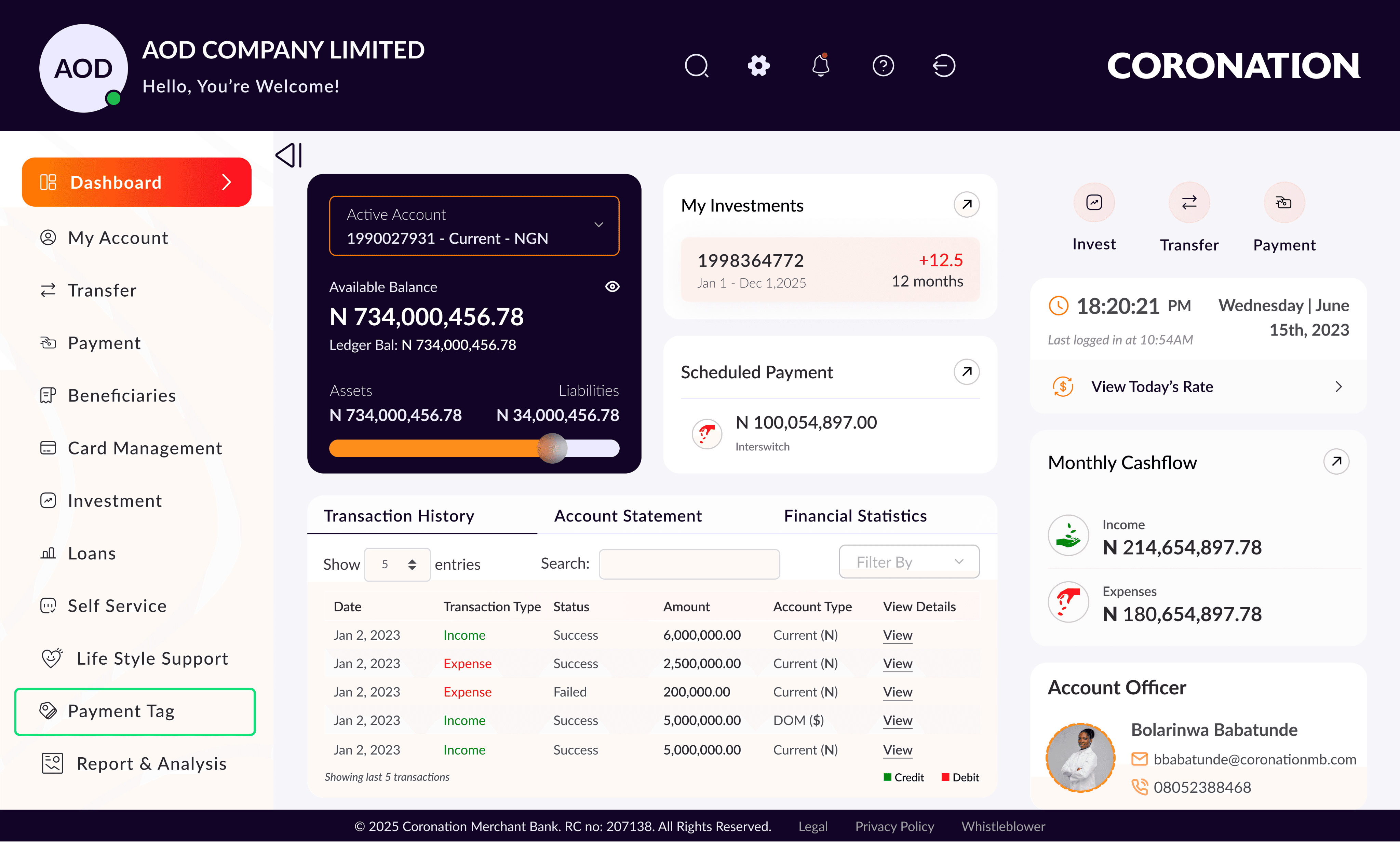
Payment Tag integrated as “a module” into CMB corporate internet banking
Decision 2: Sidebar navigation over top nav(Structural)
Corporate finance users navigate frequently between sections in a single session accounts, then transactions, then notifications. A persistent sidebar makes rapid context-switching faster than a top nav. It also scales: future menu items can be added without restructuring the entire layout.
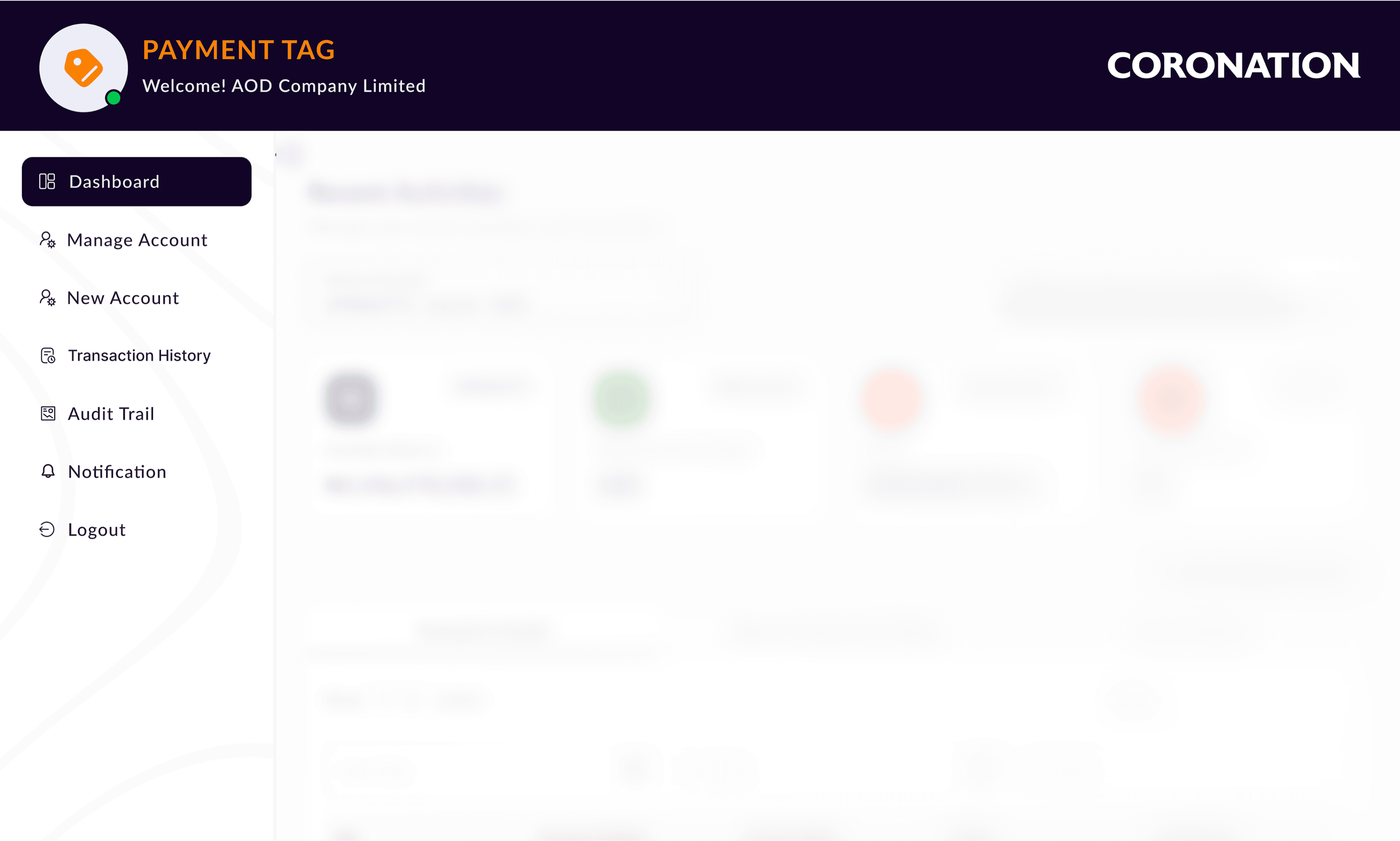
Sidebar Navigation
Decision 3: The 4-Card Metric Strip
Research surfaced four questions every finance user needs answered the moment they log in: available balance, number of virtual accounts, today's inflow, pending alerts. Each dashboard card answers exactly one. The New Inflow Alert card uses a red highlight as a proportionate urgency signal visible without being intrusive.
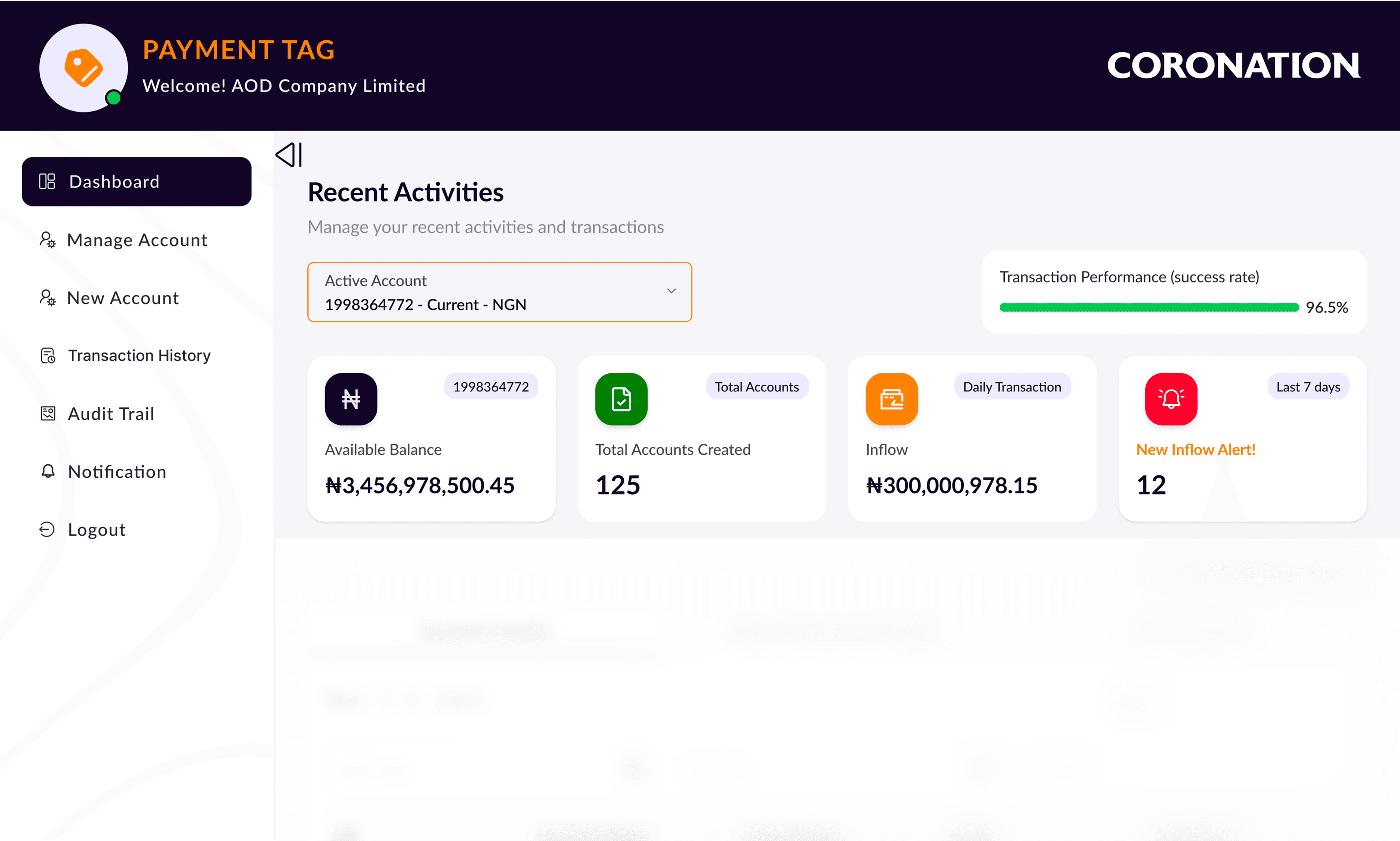
4-Card Metric
Decision 4: Tabbed content, no deep navigation for core tasks
Three tabs — Accounts Created, Recent Transaction Inflows, Account Detail keep all primary content at the same hierarchy level. Switching between account list and transaction history is instant; no back navigation, no page reload, no context loss. Confirmed by testing over a multi-page model.
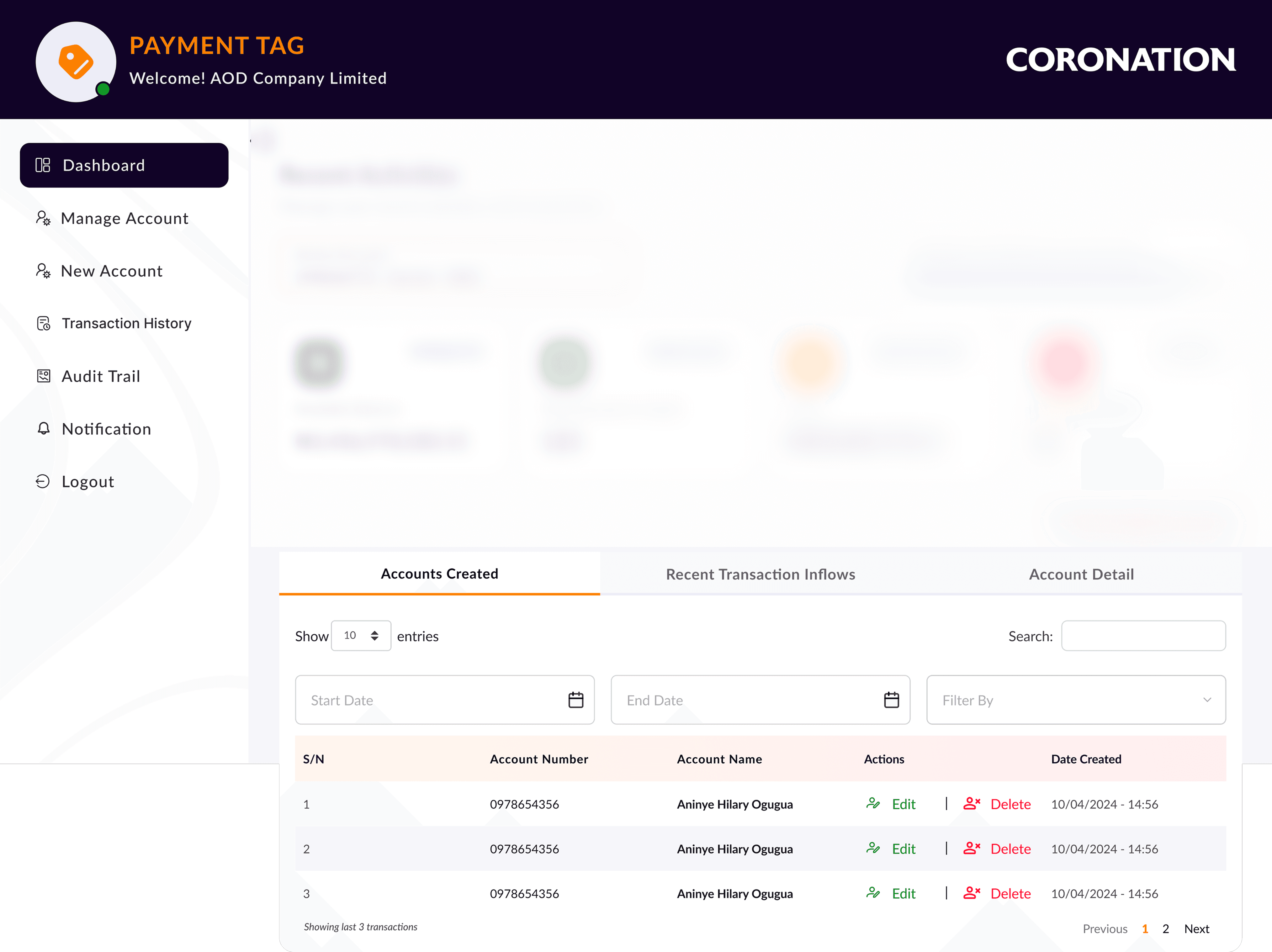
Tabbed contents on the dashboard
Challenges & How I Solved Them
Challenge 1: Designing Within an Existing System
Started with a full audit of CMB's existing internet banking UI before opening Figma. Documented every design pattern, component convention, and visual token already in use. Extended what existed every new screen felt native rather than bolted on.
Challenge 2: Security without friction, the balance nobody talks about
Mapped every destructive or consequential action and designed proportionate confirmation states. Account creation shows generated details before finalising. Account deletion uses a modal with the account name stated. Security was present everywhere pervasive nowhere.
Challenge 3: One interface, two subtly different user types
B2B and B2C users share core behaviours (create, track, receive alerts) but differ in terminology. Designed shared behaviours as the core; built flexibility into the filtering system so each type could organise data using their own reference language.
Challenge 4: Compressing a Full Design Process Into 6 Weeks
Front-loaded the research. The 2-week discovery sprint was not a luxury it was the investment that eliminated redesign later. Going into wireframing with clear, validated insights (table not cards, wizard not form) avoided the most common cause of design rework: building the wrong thing well.
Outcomes
The Payment Tags Account System eliminated the spreadsheet workaround entirely not by telling users to stop using it, but by making something better.
Key Takeaway
Even in compliance-heavy industries, user-centred design can deliver measurable business impact while genuinely delighting users. The spreadsheet workaround finance teams built out of necessity became unnecessary not because we told them to stop, but because we built something better.
Quantified impact
30% reduction in time spent on account management
+70% efficiency gain for corporate clients
Fewer support tickets self-service now works
Higher perceived trust and transparency
What the product delivers
Self-service virtual account creation and naming
Real-time transaction tracking and reconciliation
Multi-criteria filtering and search
Full audit trail downloadable and searchable
Instant inflow notifications
Reflection: What I'd Do Differently
What Worked Well
Front-loading the research sprint 2 weeks of discovery before any wireframe saved weeks of rework later
Testing with lo-fi prototypes early resolving the table vs. card debate before high-fidelity design began
The wizard pattern for account creation user confidence over speed was the right trade-off for this context
Designing within the existing system integration felt native
What I Would Do Differently
Involve operations users in testing earlier different needs surfaced post-handoff
Scope the analytics dashboard in parallel users asked for it in every session
Behind the Scenes
My Responsibilities
The project ran for 6 weeks, January to February 2026 from discovery sprint through to final design hand-off. I joined as Lead UX/UI Designer, working within an Agile product team comprising 1 Product Owner, 3 Software Engineers, 1 Scrum Master, and 1 QA Engineer.
I was responsible for defining the design direction, driving user research, crafting prototypes, an ensuring that the user experience aligned with both client needs and banking compliance standards
© 2026 Oluwafunmilola Olukanni. All rights reserved.
Senior Product/UXUI Designer · Lagos, Nigeria
Corporate Banking
B2C
Retail
B2B
UX Research
Feature Module
Virtual Accounts
Accounts in Control
Designing the Payment Tags Account System for Coronation Merchant Bank turning a spreadsheet-dependent corporate workflow into a secure, real-time virtual account management portal.Bank
Role
Lead UX/UI Designer
Timeline
6 Weeks (Jan–Feb 2026)
Platform
Web (Responsive)
Scope
B2B & B2C Corporate
The Impact at a Glance
30%
Reduction in time managing customer transactions
+70%
Increase in efficiency for corporate clients
Fewer
Fewer support tickets via improved self-service
Higher
Higher trust through transparency & security
"We didn't just build a portal.
We eliminated the spreadsheet."
The Problem
CMB's corporate clients businesses managing hundreds of customer sub-accounts every month had no native tool to do it inside the bank's platform. Finance managers were building makeshift virtual account systems in Excel, manually reconciling them against CMB statement exports every morning. Hours of error-prone work that belonged inside a banking platform, not a spreadsheet. Every manual reconciliation was an operational risk: misposted transactions, missed inflows, compliance exposure.
"It's hard to track transactions across all our customers. We manage hundreds of sub-accounts in a spreadsheet."
- Corporate Finance Manager, User Interview
Core pain points
No virtual account creation in platform
Manual reconciliation against exports
No real-time inflow visibility
No audit trail or transaction search
Compliance errors from manual data entry
Business impact
High support overhead for basic requests
Corporate client churn risk
Relationship Managers overloaded
Regulatory exposure from manual processes
Platform perceived as behind competitors
Discovery & Research: Understanding Before Designing
The Research Sprint
A focused 2-week discovery sprint ran three research tracks simultaneously to make the most of a compressed 6-week timeline: stakeholder interviews with CMB Relationship Managers (operational bottlenecks and strategic goals), user interviews with corporate finance managers and operations teams (current workflows and mental models), and a system audit of the existing internet banking platform (design patterns, technical constraints, and integration points). The finding that changed everything was not about missing features, it was that users had already invented the solution themselves, just badly. Offline, in spreadsheets.
"We need better visibility into cash inflows and outflows. Right now we find out about problems after the fact."
- Operations Director, User Interview
I began with low-fidelity sketches physical pen on paper mapping different dashboard layouts, account creation flows, and transaction filtering patterns. This stage was deliberately rough. The goal was to explore information flows quickly without the friction of software, and to get ideas in front of the Product Owner and Relationship Managers for early validation.
Sketches from discovery sprint
Design Principles for Payment Tags
Real-Time Over Retrospective
Every balance, transaction, and alert reflects the current state no waiting, no exports
Action-Oriented Dashboard
The home screen is not a report; it is a control panel. Everything surfaced should lead to a clear next action
Precision Filtering
Finance users work in specifics filter by account, date range, amount, and reference simultaneously
Security as Trust
Every data-changing action has a proportionate confirmation state secure without being paranoid
Design Process
Wireframing & Iteration
The process began with physical pen-on-paper sketches to explore dashboard layouts, account creation flows, and filtering patterns quickly and get ideas in front of the Product Owner and Relationship Managers before any digital work began. This validated structural direction before investing in Figma wireframes. Three specific design problems were resolved through structured wireframing and testing: the dashboard information hierarchy (what four questions must be answered in 10 seconds?), the account display model (table vs. cards), and the creation flow structure (single form vs. step-by-step wizard).
Problem 1: The Dashboard Information Hierarchy
What should a corporate user see the moment they log in? Research showed they needed to answer four questions instantly: What is my available balance? How many virtual accounts do I have? How much has come in today? Are there any alerts I need to act on? The solution was a 4-card metric strip at the top of the dashboard, Inflow (daily transaction total), and New Inflow Alert each card providing the answer to one of those four questions at a glance.
Proposed solution for dashboard
Problem 2: Account Table vs. Account Cards
I initially explored two approaches for displaying the list of virtual accounts: a card grid (visually richer, shows less at once) and a sortable data table (information-dense, familiar to finance users). Usability testing with a corporate finance manager resolved this quickly finance users preferred the table. They work with data. They know how to use columns, sort headers, and row actions. A table matched their mental model. The card view was deprioritized.
Proposed solution for account table vs account cards
Problem 3: The New Account Creation Flow
Creating a new virtual account required three pieces of information: a name, a customer ID(will be auto-generated in the database), and optionally a bulk file for mass account creation. A single long form felt risky errors were harder to catch and the form felt overwhelming.
Proposed solution for new account creation flow
Usability Testing: Testing Before Building
We ran iterative usability tests on the portal's main screens throughout the design phase not just at the end. This rapid feedback loop, within a 6-week timeline, here’s how specific improvements evolved:
Three testing objectives:
Do users prefer seeing real-time balances per virtual account upfront or is a summary sufficient?
Is a step-by-step 'Create Virtual Account' wizard more intuitive than a single long form?
What filters do users need at the transaction level to make the data actionable?
The results were clear:
Real-time balances per virtual account upfront - users preferred this strongly. Seeing the balance on the account list meant they could assess their portfolio without drilling down
The wizard approach won over the single form - by a significant margin. Users described the wizard as 'less stressful' and 'clearer'
Flexible multi-criteria filtering was essential - users wanted to filter by account, date range, amount, and customer reference simultaneously
Onboarding: Customer Verification Screen
BEFORE
Single long form
AFTER
Step-by-step wizard
Dashboard Landing Screen
BEFORE
No real-time inflow, alert & balances with flexible filter
AFTER
Real-time inflow, alert & balances with flexible filter
Key Design Decisions & Rational
Decision 1: Integrated module, not standalone product (Strategic)
Payment Tags was designed as a module inside CMB's existing internet banking portal not a separate login. Corporate clients were already authenticated. Adding a new destination within that familiar environment reduced learning curve, preserved trust, and avoided fragmented session management.
Payment Tag integrated as “a module” into CMB corporate internet banking
Decision 2: Sidebar navigation over top nav(Structural)
Corporate finance users navigate frequently between sections in a single session accounts, then transactions, then notifications. A persistent sidebar makes rapid context-switching faster than a top nav. It also scales: future menu items can be added without restructuring the entire layout.
Sidebar Navigation
Decision 3: The 4-Card Metric Strip
Research surfaced four questions every finance user needs answered the moment they log in: available balance, number of virtual accounts, today's inflow, pending alerts. Each dashboard card answers exactly one. The New Inflow Alert card uses a red highlight as a proportionate urgency signal visible without being intrusive.
4-Card Metric
Decision 4: Tabbed content, no deep navigation for core tasks
Three tabs — Accounts Created, Recent Transaction Inflows, Account Detail keep all primary content at the same hierarchy level. Switching between account list and transaction history is instant; no back navigation, no page reload, no context loss. Confirmed by testing over a multi-page model.
Tabbed contents on the dashboard
Challenges & How I Solved Them
Challenge 1: Designing Within an Existing System
Started with a full audit of CMB's existing internet banking UI before opening Figma. Documented every design pattern, component convention, and visual token already in use. Extended what existed every new screen felt native rather than bolted on.
Challenge 2: Security without friction, the balance nobody talks about
Mapped every destructive or consequential action and designed proportionate confirmation states. Account creation shows generated details before finalising. Account deletion uses a modal with the account name stated. Security was present everywhere pervasive nowhere.
Challenge 3: One interface, two subtly different user types
B2B and B2C users share core behaviours (create, track, receive alerts) but differ in terminology. Designed shared behaviours as the core; built flexibility into the filtering system so each type could organise data using their own reference language.
Challenge 4: Compressing a Full Design Process Into 6 Weeks
Front-loaded the research. The 2-week discovery sprint was not a luxury it was the investment that eliminated redesign later. Going into wireframing with clear, validated insights (table not cards, wizard not form) avoided the most common cause of design rework: building the wrong thing well.
Outcomes
The Payment Tags Account System eliminated the spreadsheet workaround entirely not by telling users to stop using it, but by making something better.
Key Takeaway
Even in compliance-heavy industries, user-centred design can deliver measurable business impact while genuinely delighting users. The spreadsheet workaround finance teams built out of necessity became unnecessary not because we told them to stop, but because we built something better.
Quantified impact
30% reduction in time spent on account management
+70% efficiency gain for corporate clients
Fewer support tickets self-service now works
Higher perceived trust and transparency
What the product delivers
Self-service virtual account creation and naming
Real-time transaction tracking and reconciliation
Multi-criteria filtering and search
Full audit trail downloadable and searchable
Instant inflow notifications
Reflection: What I'd Do Differently
What Worked Well
Front-loading the research sprint 2 weeks of discovery before any wireframe saved weeks of rework later
Testing with lo-fi prototypes early resolving the table vs. card debate before high-fidelity design began
The wizard pattern for account creation user confidence over speed was the right trade-off for this context
Designing within the existing system integration felt native
What I Would Do Differently
Involve operations users in testing earlier different needs surfaced post-handoff
Scope the analytics dashboard in parallel users asked for it in every session
Behind the Scenes
My Responsibilities
The project ran for 6 weeks, January to February 2026 from discovery sprint through to final design hand-off. I joined as Lead UX/UI Designer, working within an Agile product team comprising 1 Product Owner, 3 Software Engineers, 1 Scrum Master, and 1 QA Engineer.
I was responsible for defining the design direction, driving user research, crafting prototypes, an ensuring that the user experience aligned with both client needs and banking compliance standards
© 2026 Oluwafunmilola Olukanni. All rights reserved.
Senior Product/UXUI Designer · Lagos, Nigeria
Corporate Banking
B2C
Retail
B2B
UX Research
Feature Module
Virtual Accounts
Accounts in Control
Designing the Payment Tags Account System for Coronation Merchant Bank turning a spreadsheet-dependent corporate workflow into a secure, real-time virtual account management portal.Bank
Role
Lead UX/UI Designer
Timeline
6 Weeks (Jan–Feb 2026)
Platform
Web (Responsive)
Scope
B2B & B2C Corporate
The Impact at a Glance
30%
Reduction in time managing customer transactions
+70%
Increase in efficiency for corporate clients
Fewer
Fewer support tickets via improved self-service
Higher
Higher trust through transparency & security
"We didn't just build a portal.
We eliminated the spreadsheet."
The Problem
CMB's corporate clients businesses managing hundreds of customer sub-accounts every month had no native tool to do it inside the bank's platform. Finance managers were building makeshift virtual account systems in Excel, manually reconciling them against CMB statement exports every morning. Hours of error-prone work that belonged inside a banking platform, not a spreadsheet. Every manual reconciliation was an operational risk: misposted transactions, missed inflows, compliance exposure.
"It's hard to track transactions across all our customers. We manage hundreds of sub-accounts in a spreadsheet."
- Corporate Finance Manager, User Interview
Core pain points
No virtual account creation in platform
Manual reconciliation against exports
No real-time inflow visibility
No audit trail or transaction search
Compliance errors from manual data entry
Business impact
High support overhead for basic requests
Corporate client churn risk
Relationship Managers overloaded
Regulatory exposure from manual processes
Platform perceived as behind competitors
Discovery & Research: Understanding Before Designing
The Research Sprint
A focused 2-week discovery sprint ran three research tracks simultaneously to make the most of a compressed 6-week timeline: stakeholder interviews with CMB Relationship Managers (operational bottlenecks and strategic goals), user interviews with corporate finance managers and operations teams (current workflows and mental models), and a system audit of the existing internet banking platform (design patterns, technical constraints, and integration points). The finding that changed everything was not about missing features, it was that users had already invented the solution themselves, just badly. Offline, in spreadsheets.
"We need better visibility into cash inflows and outflows. Right now we find out about problems after the fact."
- Operations Director, User Interview
I began with low-fidelity sketches physical pen on paper mapping different dashboard layouts, account creation flows, and transaction filtering patterns. This stage was deliberately rough. The goal was to explore information flows quickly without the friction of software, and to get ideas in front of the Product Owner and Relationship Managers for early validation.
Sketches from discovery sprint
Design Principles for Payment Tags
Real-Time Over Retrospective
Every balance, transaction, and alert reflects the current state no waiting, no exports
Action-Oriented Dashboard
The home screen is not a report; it is a control panel. Everything surfaced should lead to a clear next action
Precision Filtering
Finance users work in specifics filter by account, date range, amount, and reference simultaneously
Security as Trust
Every data-changing action has a proportionate confirmation state secure without being paranoid
Design Process
Wireframing & Iteration
The process began with physical pen-on-paper sketches to explore dashboard layouts, account creation flows, and filtering patterns quickly and get ideas in front of the Product Owner and Relationship Managers before any digital work began. This validated structural direction before investing in Figma wireframes. Three specific design problems were resolved through structured wireframing and testing: the dashboard information hierarchy (what four questions must be answered in 10 seconds?), the account display model (table vs. cards), and the creation flow structure (single form vs. step-by-step wizard).
Problem 1: The Dashboard Information Hierarchy
What should a corporate user see the moment they log in? Research showed they needed to answer four questions instantly: What is my available balance? How many virtual accounts do I have? How much has come in today? Are there any alerts I need to act on? The solution was a 4-card metric strip at the top of the dashboard, Inflow (daily transaction total), and New Inflow Alert each card providing the answer to one of those four questions at a glance.
Proposed solution for dashboard
Problem 2: Account Table vs. Account Cards
I initially explored two approaches for displaying the list of virtual accounts: a card grid (visually richer, shows less at once) and a sortable data table (information-dense, familiar to finance users). Usability testing with a corporate finance manager resolved this quickly finance users preferred the table. They work with data. They know how to use columns, sort headers, and row actions. A table matched their mental model. The card view was deprioritized.
Proposed solution for account table vs account cards
Problem 3: The New Account Creation Flow
Creating a new virtual account required three pieces of information: a name, a customer ID(will be auto-generated in the database), and optionally a bulk file for mass account creation. A single long form felt risky errors were harder to catch and the form felt overwhelming.
Proposed solution for new account creation flow
Usability Testing: Testing Before Building
We ran iterative usability tests on the portal's main screens throughout the design phase not just at the end. This rapid feedback loop, within a 6-week timeline, here’s how specific improvements evolved:
Three testing objectives:
Do users prefer seeing real-time balances per virtual account upfront or is a summary sufficient?
Is a step-by-step 'Create Virtual Account' wizard more intuitive than a single long form?
What filters do users need at the transaction level to make the data actionable?
The results were clear:
Real-time balances per virtual account upfront - users preferred this strongly. Seeing the balance on the account list meant they could assess their portfolio without drilling down
The wizard approach won over the single form - by a significant margin. Users described the wizard as 'less stressful' and 'clearer'
Flexible multi-criteria filtering was essential - users wanted to filter by account, date range, amount, and customer reference simultaneously
Onboarding: Customer Verification Screen
BEFORE
Single long form
AFTER
Step-by-step wizard
Dashboard Landing Screen
BEFORE
No real-time inflow, alert & balances with flexible filter
AFTER
Real-time inflow, alert & balances with flexible filter
Key Design Decisions & Rational
Decision 1: Integrated module, not standalone product (Strategic)
Payment Tags was designed as a module inside CMB's existing internet banking portal not a separate login. Corporate clients were already authenticated. Adding a new destination within that familiar environment reduced learning curve, preserved trust, and avoided fragmented session management.
Payment Tag integrated as “a module” into CMB corporate internet banking
Decision 2: Sidebar navigation over top nav(Structural)
Corporate finance users navigate frequently between sections in a single session accounts, then transactions, then notifications. A persistent sidebar makes rapid context-switching faster than a top nav. It also scales: future menu items can be added without restructuring the entire layout.
Sidebar Navigation
Decision 3: The 4-Card Metric Strip
Research surfaced four questions every finance user needs answered the moment they log in: available balance, number of virtual accounts, today's inflow, pending alerts. Each dashboard card answers exactly one. The New Inflow Alert card uses a red highlight as a proportionate urgency signal visible without being intrusive.
4-Card Metric
Decision 4: Tabbed content, no deep navigation for core tasks
Three tabs — Accounts Created, Recent Transaction Inflows, Account Detail keep all primary content at the same hierarchy level. Switching between account list and transaction history is instant; no back navigation, no page reload, no context loss. Confirmed by testing over a multi-page model.
Tabbed contents on the dashboard
Challenges & How I Solved Them
Challenge 1: Designing Within an Existing System
Started with a full audit of CMB's existing internet banking UI before opening Figma. Documented every design pattern, component convention, and visual token already in use. Extended what existed every new screen felt native rather than bolted on.
Challenge 2: Security without friction, the balance nobody talks about
Mapped every destructive or consequential action and designed proportionate confirmation states. Account creation shows generated details before finalising. Account deletion uses a modal with the account name stated. Security was present everywhere pervasive nowhere.
Challenge 3: One interface, two subtly different user types
B2B and B2C users share core behaviours (create, track, receive alerts) but differ in terminology. Designed shared behaviours as the core; built flexibility into the filtering system so each type could organise data using their own reference language.
Challenge 4: Compressing a Full Design Process Into 6 Weeks
Front-loaded the research. The 2-week discovery sprint was not a luxury it was the investment that eliminated redesign later. Going into wireframing with clear, validated insights (table not cards, wizard not form) avoided the most common cause of design rework: building the wrong thing well.
Outcomes
The Payment Tags Account System eliminated the spreadsheet workaround entirely not by telling users to stop using it, but by making something better.
Key Takeaway
Even in compliance-heavy industries, user-centred design can deliver measurable business impact while genuinely delighting users. The spreadsheet workaround finance teams built out of necessity became unnecessary not because we told them to stop, but because we built something better.
Quantified impact
30% reduction in time spent on account management
+70% efficiency gain for corporate clients
Fewer support tickets self-service now works
Higher perceived trust and transparency
What the product delivers
Self-service virtual account creation and naming
Real-time transaction tracking and reconciliation
Multi-criteria filtering and search
Full audit trail downloadable and searchable
Instant inflow notifications
Reflection: What I'd Do Differently
What Worked Well
Front-loading the research sprint 2 weeks of discovery before any wireframe saved weeks of rework later
Testing with lo-fi prototypes early resolving the table vs. card debate before high-fidelity design began
The wizard pattern for account creation user confidence over speed was the right trade-off for this context
Designing within the existing system integration felt native
What I Would Do Differently
Involve operations users in testing earlier different needs surfaced post-handoff
Scope the analytics dashboard in parallel users asked for it in every session
Behind the Scenes
My Responsibilities
The project ran for 6 weeks, January to February 2026 from discovery sprint through to final design hand-off. I joined as Lead UX/UI Designer, working within an Agile product team comprising 1 Product Owner, 3 Software Engineers, 1 Scrum Master, and 1 QA Engineer.
I was responsible for defining the design direction, driving user research, crafting prototypes, an ensuring that the user experience aligned with both client needs and banking compliance standards
© 2026 Oluwafunmilola Olukanni. All rights reserved.
Senior Product/UXUI Designer · Lagos, Nigeria